About Text Variables
A text variable is an item or group of items whose value can vary according to the context.
Combine text variables with text strings
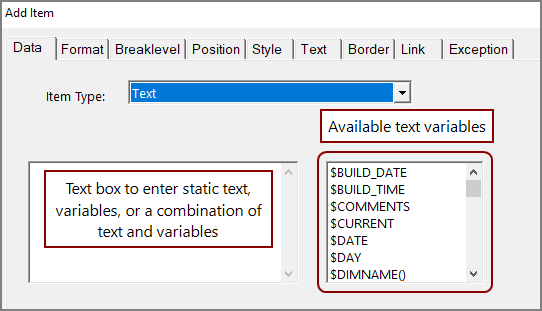
To add a text variable to the text item, double-click the variable in the list or enter the text variable in the text box using all capital letters. You can add preceding and trailing text to a text item. Preceding text must be separated from the text variable by a space, and trailing text must be separated from the text variable by at least two spaces.
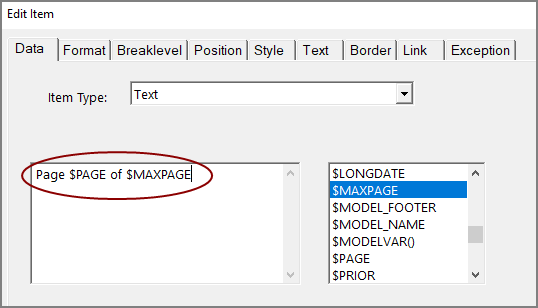
For example, the Last Page Number variable ($MAXPAGE) displays the page number of the report's last page. If you add or remove pages, ProDiver updates the value of the variable accordingly. If you want your report to display page numbers using the format “Page 1 of 10”, you can create a page-number variable string that combines text and two variables, $PAGE and $MAXPAGE, to accomplish this result.
For  example:
Page $PAGE of $MAXPAGE
Text item options
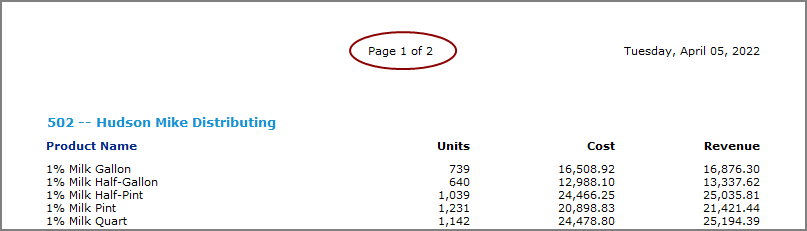
Unless otherwise specified, ProDiver places the value of a new text item centered at the top of the report page. For example, if you enter the example page-number variable string and use the default position and style options, ProDiver centers the page number at the top of each page of the report. You can customize the text item, such where it appears on the report, by using options available on other tabs on the Add and Edit Item dialog boxes.
Available text variables
The following table lists the text variables that are available on the Text item, Data tab on the Add Item and Edit Item dialog boxes.
| Text Variable | Description | See also |
|---|---|---|
| $BUILD_DATE | Inserts the creation date for the cBase or model, or the date when the last model in a multimodel DivePlan is created. The format is dddd, MMMM dd, yyyy, which displays as Friday, April 8, 2022. Optionally, in a multimodel DivePlan, you can specify the build date for a different cBase or model by entering its full path. |
Adding a Build Date and Build Time Item |
| $BUILD_TIME | Inserts the creation time for the cBase or model, or the time when the last model in a multimodel DivePlan was created. The format is HH:mm, which displays as 13:22. Optionally, in a multimodel DivePlan, you can specify the build time for a different cBase or model by entering its full path. |
|
| $COMMENTS | Inserts a text string that is defined when the cBase or model is created. In a cBase, $COMMENTS is defined in the build script in the Description property of the cBase output object. In a model, $COMMENTS is defined in the Builder object, Model Variable Options, Comments property. |
Adding a Comments Item |
| $CURRENT | Inserts the value of the current period in a Period Comparison report. | Adding Current and Prior Period Items |
| $DATE |
Inserts the current system date. The default format is dddd, MMMM dd, yyyy, gg which displays as Wednesday, April 06, 2022 A.D. You can reformat the date by entering a formatting argument after the variable, such as dd-MM-yyyy, in parentheses with no spaces. In the $DATE format strings, you must enter the letters "d", "y", and "g" (for period, if available) in lowercase and the letter "M" in uppercase. |
Adding Date Items |
| $DAY | Inserts the day of the week based on the current server system date. The format is dddd, which displays the full day of the week, such as Thursday. | Adding Day and Time Items |
| $DIMNAME(n) | Inserts a dimension name from a MultiTab report. Dimension names appear as column headings from left to right across the top of the report. The argument (n) = a number from 1 through n. | Adding Dimension Name and Value Items |
| $DIMVAL(n) | Inserts a dimension value or values from a MultiTab report. Dimension values appear as row items below their respective dimension column headings. The argument (n) = a number from 1 through n. | |
| $EXTRACT_DATE |
Inserts the extraction date for the cBase or model source data, or the date of when the data for the last model in a multimodel DivePlan is extracted. The date format is dddd, MMMM dd, yyyy, which displays as Friday, March 22, 2022. The extract date, or the extract date and time, must be specified as part of the build. In a cBase, $EXTRACT_DATE and $EXTRACT_TIME are defined in the Extract Time property of the cBase output object in the build script. In a model, $EXTRACT_DATE and $EXTRACT_TIME are defined in the Model Variable Options, Extract_Time variable of the model output object. Optionally, in a multimodel DivePlan, you can specify the extract date for a different cBase or model by entering its full path. |
Adding Extract Date and Time Items |
| $EXTRACT_TIME |
Inserts the extraction time for the cBase or model source data or the time when the data for the last model in a multimodel DivePlan is extracted. The time is formatted as HH:mm, which displays as 13:22. The extraction date, or the extraction date and time, must be specified as part of the build. In a cBase, $EXTRACT_DATE and $EXTRACT_TIME are defined in the Extract Time property of the cBase output object in the build script. In a model, $EXTRACT_DATE and $EXTRACT_TIME are defined in the Model Variable Options, Extract_Time variable of the model output object. Optionally, in a multimodel DivePlan, you can specify the extraction time for a different cBase or model by entering its full path. |
|
| $FIND_COLUMN | Inserts the name of a column heading that is used as part of a Find action. | Adding the Column Name and Low and High Values Used in a Find Action |
| $FIND_DATE_FROM | Inserts the earliest value of a Find Date Range action. | Adding the Earliest and Latest Date in a Find Action |
| $FIND_DATE_TO | Inserts the latest value of a Find Date Range action. | |
| $FIND_HIGH | Inserts the high value of a Numeric Find action. | Adding the Column Name and Low and High Values Used in a Find Action |
| $FIND_LOW | Inserts the low value of a Numeric Find action. | |
| $FIND_PERIOD_FROM | Inserts the earliest value of a Find Period Range action. | Adding the Earliest and Latest Date in a Find Time Period Action |
| $FIND_PERIOD_TO | Inserts the latest value of a Find Period Range action. | |
| $FOOTER | Inserts the contents of the Footer text box from File > Page Setup > Headers. | Adding Page Header and Footer Items |
| $HEADER | Inserts the contents of the Header text box from File > Page Setup > Headers | |
| $INFONAME( ) | Inserts an Info Field name added to a tabular report. | Adding Info Name and Value Items |
| $INFOVAL( ) | Inserts an Info Field value added to a tabular report. | |
| $LONGDATE | Inserts the current server system date. The format is dddd, MMMM dd, yyyy, which displays as Wednesday , April 06, 2022. | Adding Date Items |
| $MAXPAGE | Inserts the last page number of the report. | Adding a Page and Maximum Page Number Items |
| $MODEL_FOOTER | Inserts what is entered as a footer in the cBase or model that is used to create the report. The footer must be specified as part of the build. In a cBase, $MODEL_FOOTER is defined in the cBase output object of the build script as a user defined property, of type CustomProperty, named footer. In a model, $MODEL_FOOTER is defined in the Model Variable Options, Footer variable of the model output object. Optionally, in a multimodel DivePlan, you can specify the full path for a different cBase or model name as an argument, and ProDiver inserts the footer content for that cBase or model. |
Adding a Model Footer Item |
| $MODEL_NAME( ) |
Inserts the name of the cBase or model that is used to create the report or the name of the last cBase or model in a DivePlan. Optionally, in a multimodel DivePlan, you can specify the full path to a different cBase or model as an argument, and ProDiver inserts the name for that cBase or model. |
Adding a Model Name Item |
| $MODELVAR(<var>,<model>) |
Inserts the value of a custom property that is created by the developer during the cBase build process or a named variable that is created in a model. The argument <var> is the name of the custom property in the cBase or the named variable in the model. Optionally, in a multimodel DivePlan, you can enter (<var>,<model>) as the argument, where <model> is the full path to a different cBase or model in the DivePlan. The (<var>,<model>) argument retrieves the custom property from the specified cBase or the named variable from the specified model. |
Adding a Model Variable Name Item |
| $PAGE | Inserts the current page number on each page of the report. | Adding a Page and Maximum Page Number Items |
| $PRIOR | Inserts a previous period value from a Period Comparison report. The date format is MMMM d, yyyy, which displays as May 1, 2022. | Adding Current and Prior Period Items |
| $QVVAL( ) | Inserts the value for a QuickView. | Adding the Name and Value for a QuickView Item |
| $ROW | Inserts the row numbers for the dimension values of a report. | Adding Row and Sort Column Items |
| $SHORTDATE | Inserts the current system date. The format is d/M/yyyy, which displays as 4/6/2022. | Adding Date Items |
| $SORT_COLUMN | Displays which column heading the report uses to sort values up or down. | Adding Row and Sort Column Items |
| $SUMNAME( ) | Displays the name of a summary column heading from a MultiTab report. | Adding Summary Name and Value Items |
| $SUMVAL( ) | Inserts the value of $SUMVAL(n, B), where “n” defines the type of summary value(s) and “B” defines the breaklevel. | |
| $TIME | Inserts the current system time. The format is h:mm tt, which displays as 11:17 AM. | Adding Day and Time Items |
| $TOTAL_STRING | Displays the string total or subtotal. | Adding a Subtotal Text String |
| $XTAB_DIMENSION | Displays the horizontal dimension selected for a CrossTab report. | Adding CrossTab Summary and Dimension Items |
| $XTAB_ELEMENT | Displays the summary field selected for a CrossTab report. |
See also:
Mentioned in: