Adding CrossTab Summary and Dimension Items
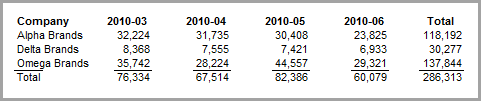
This procedure describes how to create a CrossTab report and then add back the summary and dimension values as items.
Complete the following steps:
-
Open the model sales_90day.mdl.
-
On the Console, double-click Company.
-
To open the CrossTab dialog box, click the CrossTab icon.
-
Select Ship Month as the Horizontal Dimension and Cases as the Summary.
-
Click OK to
 view the dive window.
 -
Click the Report icon to open the Default Report dialog box, accept the defaults, and click OK to
view the report. -
Click the Add Item icon to open the Edit Item dialog box and perform the following actions:
- Click the $XTAB_ELEMENT.
- Type Summary: before the variable name.
- In the Breaklevel tab, select Page as the Breaklevel and Head as the Location.
- In the Position tab, select Page Left as the Column and type -20 in the Vertical offset field.
-
Click OK to
view the report. -
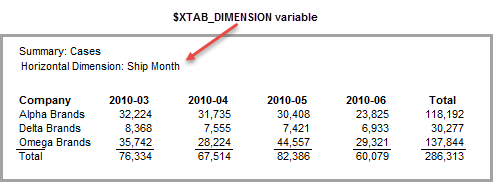
To display the horizontal dimension, click the Add Item icon and perform the following actions:
- Click the $XTAB_DIMENSION.
- Type Horizontal Dimension: before the variable name.
- In the Breaklevel tab, select Page as the breaklevel and Head as the Location.
- In the Position tab, select Page Left as the Column and type -5 in the Vertical offset field.
-
Click OK to
view the report.