Adding a Model Variable Name Item
NOTE: The following procedure is for illustration purposes. The model used as an example in this topic is not included with the documentation.
Complete the following steps:
-
Open a cBase or model and build a tabular report or open the inserting_metadata marker if previously saved.
-
Unlock the report, and click the Add Item icon.
-
For the Item Type, select Text.
-
Select the $MODELVAR() variable.
-
Preceding the variable name, enter the following text: Named Variable:
-
Enter the following named variable and model path in the parentheses.
$MODELVAR(darius,c:\Info_Dimins\Diver_Rewrite\Test_Model_Variable\TEST\test2.mdl)
Where:
- <var> = darius
- <model> = c:\Info_dimins\Diver_Rewrite\Test_Model_Variable\TEST\test2.mdl
-
Click OK to
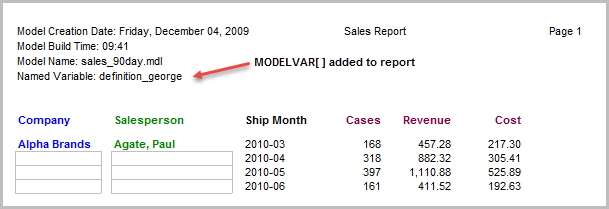
 display the value of Name Variable: definition_george in the report heading.
 -
Click File > Save Marker as inserting_metadata to continue using this report in other topics.