Adding Info Name and Value Items
Complete the following steps to add an Others value as a report item:
- Select a server with a project that contains a sales model with Customer and Product Family dimensions, and info fields.
- For example, locate and open demo.drl.mdl using ProDiver.
- On the Console, double-click Customer.
- On the dive window, click 502 -- Hudson Mike Distributing.
- On the Console, double-click Product Family.
- On the dive window, use Shift+Click to select Butter and Cheese.
- Click the Focus icon.
- Double-click the blank column to the right of the Revenue column to open the Add Column dialog box.
- Select Display All as the Info Columns field.
- Click Address1 in the Info Columns box.
-
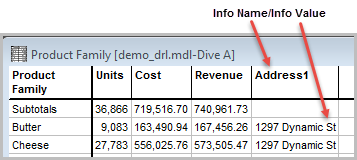
Click OK
 to add Address1, the Info Name, as the column heading, and 1297 Dynamic St as the Info Value in the dive window.
 -
Click the Report icon to open the Default Report dialog box.
-
Click OK to accept the default values, then unlock and
display the report.