Adding a Model Name Item
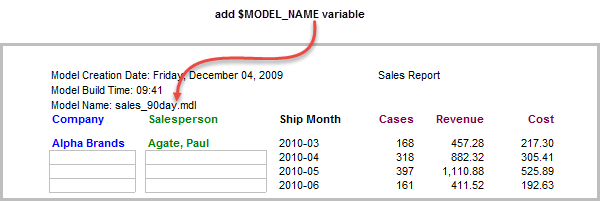
To illustrate how to enter the cBase or model name, open any ProDiver report or open the inserting_metadata marker created in the Adding a Comments Item topic.
Complete the following steps:
-
Open a cBase or model and build a tabular report or open the inserting_metadata marker created in the Adding a Build Date and Build Time Item topic.
-
Unlock the report, and click the Add Item icon.
-
For the Item Type, select Text.
-
Select the $MODEL_NAME variable.
-
Enter Model Name:
 preceding the variable.
 -
On the Position tab, select Left as the column position, and enter 30 in the Vertical box.
-
Click OK to
view the report. -
Click File > Save Marker as inserting_metadata to continue using this report in other topics.