Spectre Flow Process Code Blocks
Flow process code blocks transform data and provide ways to combine multiple data sources.
 Alias Process
This code block can rename, remove, or reorder columns. For information about the corresponding Spectre Flow Editor object, see Spectre Flow Alias Process Object. The Alias Process code block has the following structure:
alias "<name>" {
source "<source>"
alias-column "<new-name>" {
from-column "<old-name>"
}
copy-column "<new-column-name>" {
from-column "<original-column-name>"
}
remove-other-columns
remove-column "<name>"
prefix "<prefix>"
}
Alias Process Tags
alias-column
Renames or keeps a column in the data flow. The order in which columns are listed determines the keep order of the output columns, unless the remove-other-columns tag is present.
copy-column
Copies an existing column in the data flow. The new column retains all column properties of the original column.
from-column
Specifies the name of the source column being renamed. Sub tag for the alias-column tag. This tag is optional if the remove-other-columns tag is present.
remove-other-columns
If present, the remove-column and prefix tags are not used, any columns not listed in the alias-column tag are removed, and the output column order is specified as listed in the alias-column tag. If not present, the remove-column and prefix tags are used and the column order is preserved. Optional.
remove-column
Removes a column in the data flow. Optional.
prefix
If set, the provided string is added to the beginning of the name of each output column. Optional.
Break Process
This code block creates columns that mark various rows based on their placement in groups of similar rows. For information about the corresponding Spectre Flow Editor object, see Spectre Flow Break Process Object. The Break Process code block has the following structure:
break "<name>" {
source "<source>"
break-column "<break-column-name>"
first-column "<first-column-name>"
last-column "<last-column-name>"
index-column "<index-column-name>"
level-column "<level-column-name>"
}
Break Process Tags
break-column
Specifies a column that determines the groups of similar rows. Whenever the value on this column changes from one row to the next, the next row begins a new group. Multiple break columns can be specified.
first-column
Specifies the name of a new column that indicates the beginning of a break level. This column has a value of true on the first row of a break level, and false for every other row of the break level.
last-column
Specifies the name of a new column that indicates the end of a break level. This column has a value of true on the last row of a break level, and false for every other row of the break level.
index-column
Specifies the name of a new column that indexes a break level. This column has a value of 1 on the first row of a break level, 2 on the second row, and so on.
level-column
Specifies the name of a new column that counts the number of break columns having the same values as the previous row in order.
NOTE:
-
If the value of the first break column is different from the previous value, this column has a value of 0.
-
If the first break column has the same value as the previous value, but the second break column is different, this column has a value of 1.
-
These conditional values are summed such that this column can be used to detect intermediate break levels.
Calc Process
This code block can add or replace columns with the results of calculated expressions. For information about the corresponding Spectre Flow Editor object, see Spectre Flow Calc Process Object. The Calc Process code block has the following structure:
calc "<name>" {
source "<source>"
calc-list {
source "<source>"
}
add-column "<name>"
replace-column "<name>"
}
Calc Process Tags
add-column
Defines a new column. Multiple columns can be added. This tag cannot be included if the calc-list tag exists. Optional.
replace-column
Specifies a column to be changed. Multiple columns can be changed. This tag cannot be included if the calc-list tag exists. Optional.
calc-list
Specifies a file containing multiple calculations to run. This file can come from a text input code block or can be created in a list input code block and passed to the calc code block. This tag cannot be included if the add-column or replace-column tags exist. Optional. For more information, see Spectre Flow Calculation List File. There is one sub tag for this tag:
-
source—Similar to any other source tag, this specifies the input code block from which to read the calc list.
expression
The expression used to calculate data in the column.
Chop Process
This code block creates separate rows for each value in a separated by a specified delimiter. For information about the corresponding Spectre Flow Editor object, see Spectre Flow Chop Process Object. The Chop Process code block has the following structure:
chop "<name>" {
source "<source>"
chop-column "<input-column-name>"
delimiter "<tab|comma|other-delimiter>"
no-trim
no-quotes
output-column "<output-column-name>"
}
Chop Process Tags
chop-column
Specifies the column to chop. For each input row, the value in the chop column is split, and one row is generated for each sub-string. An empty chop-column value still produces one row (with a blank string in the output column).
delimiter
Specifies the delimiter character, either as a single character literal or by name as either tab or comma. The default value is tab. Optional.
no-quotes
If present, double-quotes are preserved in parsed values. Optional.
no-trim
If present, white space is preserved in parsed values. Optional.
output-column
Specifies a new output column. This replaces the chop column and contains the sub-string values.
Concat Process
This code block creates a new table by concatenating multiple source tables. For information about the corresponding Spectre Flow Editor object, see Spectre Flow Concat Process Object. The Concat Process code block has the following structure:
concat "<name>" {
source "<source1>" "<source2>"...
}
The only tag available for the Concat Process code block is the source tag, which allows multiple sources. When multiple sources are specified, the tables are concatenated in the order in which they are listed. Null values are added if a source is missing a column. The code block does not change any tables if only one source is specified.
Expand Process
This code block expands a single row into multiple rows. For information about the corresponding Spectre Flow Editor object, see Spectre Flow Expand Process Object. The Expand Process code block has the following structure:
expand "<name>" {
source "<source>"
start-column "<start-column>"
end-column "<end-column>"
output-column "<output-column>"
}
Expand Process Tags
start-column
Specifies a column containing the starting value for the expand operation.
end-column
Specifies a column containing the ending value for the expand operation.
output-column
Defines the name of the output column containing the expanded values.
Filter Process
This code block removes or keeps rows based on a list of provided values. For information about the corresponding Spectre Flow Editor object, see Spectre Flow Filter Process Object. The Filter Process code block has the following structure:
filter "<name>" {
source "<source>"
action "<action-type>"
column "<column-name>" {
value `<expression>`
}
}
Filter Process Tags
action
Determines what to do with rows that match the criteria provided in the value tags. Action types are keep and remove. Default value is keep. Optional.
column
Specifies the name of which column you want to apply the filter to.
value
A sub tag of the column tag. Specifies the column value that must be matched to determined whether a row is kept or removed from the output.
Filter Expr Process
This code block removes rows based on an expression. For information about the corresponding Spectre Flow Editor object, see Spectre Flow Filter Expression Process Object. The Filter Expr Process code block has the following structure:
filter-expr "<name>" {
source "<source>"
expression `<expression>`
}
Filter Expression Process Tags
expression
The expression used to determine whether to keep a row. When the expression evaluates to true, the row is kept.
Join Process
This code block combines rows from two source tables. For information about the corresponding Spectre Flow Editor object, see Spectre Flow Join Process Object. The Join Process code block has the following structure:
join "<name>" {
source "<left-source>" "<right-source>"
join-type "<join-type>"
join-column "<output-column-name>"
left-column "<output-column-name>"
right-column "<output-column-name>"
include-other-left-columns
include-other-right-columns
}
NOTE:If multiple records in one source have the same values for the join columns, they are not squashed. Instead, the output has a record for each input record. If that happens for both sources, then the output multiplies the records. For example if the left source has three matching records and the right source has two, the output has six records for those join column values.
Join Process Tags
join-type
Determines the type of join that is performed. The default value of this tag is inner. The join types in the Join Process code block closely match those used in classical relational database logic. The following join types are supported:
- inner—Only rows that have matching join columns in both input flows are returned in the output flow. If a flow has duplicate rows with the same join column values, then a cartesian product of the matching rows is returned in the output flow. If a column exists in both flows, its "left" flow values are kept.
- outer—All rows are returned in the output flow. If a row in one flow does not have a match in the other flow, then it is matched with a row of blank values. As with the inner join, a cartesian product is returned for duplicate rows when present in both flows.
- left outer—All rows from the first (left) flow are returned. If the join column values for a row in the left flow does not match the join column values for any row in the right flow, it is matched with a row of blank values for right flow columns. If a flow has duplicate rows with the same join column values, then a cartesian product of the matching rows is returned in the output flow.
- right outer—All rows from the second (right) flow are returned. If the join column values for a row in the right flow does not match the join column values for any row in the left flow, it is matched with a row of blank values for left flow columns. If a flow has duplicate rows with the same join column values, then a cartesian product of the matching rows is returned in the output flow.
join-column
Specifies a column that contains values matched from both sides during the join. Multiple join columns can be specified. Optional. Has the following sub tags:
-
from-left-column—Specifies the column from the left table to use in the join. Optional.
-
from-right-column—Specifies the column from the right table to use in the join. Optional.
- label—Defines the display label used for a column. Optional.
-
format—Use to format numbers, dates, periods, currency, and Boolean values. Sets both the display format and the input properties, unless a separate input format is specified. Optional.
-
summary-type—Sets the summary type of the column explicitly. Any summary function that takes a single argument (except for count and percentile) is allowed. Optional. See Summary Functions.
Most common values are: sum, info, any, first, last and const. The default for numeric data is sum; use const for a column with only one value. The rest of the functions (for example, min, average, median) are better done as a separate calculation, that is, not the default one.
-
sort-by—Specifies an alternate sort. When specifying columns, use sort by to order them based on the value of another column. Optional.
left-column
Specifies a column to use from the left side. Has the following sub tags:
- from-column—Specifies the column from the left table to use in the join. Optional.
- label—Defines the display label used for a column. Optional.
-
format—Use to format numbers, dates, periods, currency, and Boolean values. Sets both the display format and the input properties, unless a separate input format is specified. Optional.
-
summary-type—Sets the summary type of the column explicitly. Any summary function that takes a single argument (except for count and percentile) is allowed. Optional. See Summary Functions.
Most common values are: sum, info, any, first, last and const. The default for numeric data is sum; use const for a column with only one value. The rest of the functions (for example, min, average, median) are better done as a separate calculation, that is, not the default one.
-
sort-by—Specifies an alternate sort. When specifying columns, use sort by to order them based on the value of another column. Optional.
right-column
Specifies a column to use from the right side. Has the following sub tags:
- from-column—Specifies the column from the right table to use in the join. Optional.
- label—Defines the display label used for a column. Optional.
-
format—Use to format numbers, dates, periods, currency, and Boolean values. Sets both the display format and the input properties, unless a separate input format is specified. Optional.
-
summary-type—Sets the summary type of the column explicitly. Any summary function that takes a single argument (except for count and percentile) is allowed. Optional. See Summary Functions.
Most common values are: sum, info, any, first, last and const. The default for numeric data is sum; use const for a column with only one value. The rest of the functions (for example, min, average, median) are better done as a separate calculation, that is, not the default one.
-
sort-by—Specifies an alternate sort. When specifying columns, use sort by to order them based on the value of another column. Optional.
include-other-left-columns
If present, any left side columns not mentioned in the join-column or left-column tags are included in the output. Optional.
include-other-right-columns
If present, any right side columns not mentioned in the join-column or right-column tags are included in the output. Optional.
Lookup Process
This code block adds columns from a lookup table. For information about the corresponding Spectre Flow Editor object, see Spectre Flow Lookup Process Object. The Lookup Process code block has the following structure:
lookup "<name>" {
source "<main-source>" "<lookup-source>"
key "<main-column-name>" "<lookup-column-name>"
range-key "<main-column-name>" "<lookup-begin-column-name>" "<lookup-end-column-name>"
column "<column-name>"
include-other-columns
drop-column "<column-name>"
resolve-duplicates "<resolution-type>"
case-insensitive
update
}
A lookup is like a join with join type left outer, except that:
-
At least one key or range-key must be provided.
-
It always includes all the main columns.
-
It matches at most one lookup row for each main row.
-
It supports range columns.
Lookup Process Tags
key
Specify a pair of columns to match during the lookup. Multiple keys can be specified.
range-key
Specifies that a lookup row meets the match criteria if the main column value falls between the values of the begin and end columns of the lookup code block. Multiple range keys can be specified.
column
Specifies a column to take from the lookup source. If no columns are specified, then all columns not referenced in the key or range-key tags are brought in from the lookup source. Optional. Has the following sub tags:
- from-column—Specifies the lookup table column to include in the output. Optional.
- label—Defines the display label used for a column. Optional.
format—Use to format numbers, dates, periods, currency, and Boolean values. Sets both the display format and the input properties, unless a separate input format is specified. Optional.
summary-type—Sets the summary type of the column explicitly. Any summary function that takes a single argument (except for count and percentile) is allowed. Optional. See Summary Functions.
Most common values are: sum, info, any, first, last and const. The default for numeric data is sum; use const for a column with only one value. The rest of the functions (for example, min, average, median) are better done as a separate calculation, that is, not the default one.
sort-by—Specifies an alternate sort. When specifying columns, use sort by to order them based on the value of another column. Optional.
include-other-columns
If present, any lookup column not mentioned in the key, range-key, or column tags is included in the output. Optional.
prefix
If set, the string you provide is added to the beginning of the name of each output column. Optional.
drop-column
Indicates that the named column from the lookup source should not be included in the output. This tag is only available if the include-other-columns tag is present, or if there are no column tags. Multiple columns can be dropped. Optional.
resolve-duplicates
Specifies the way duplicate entries in the lookup table are handled. All lookup values from duplicated rows are processed using the method named in this tag. The default tag value is strict. The available options are:
-
strict—If any duplicates are found, output an error and end the running of the script in a failure.
-
first—Use the first matching record and discard the rest.
-
last—Use the last matching record and discard the rest.
-
any—Use any matching record and discard the rest.
case-insensitive
If this tag is present, the lookup operation ignores differences in case between values.
update
If this tag is present, any time an incoming column shares a name with a column in the main table, then the columns are merged. In this merge process, incoming values are used except when an incoming value is null. If this tag is absent and an incoming column shares a name with a column in the main table, the script errors and fails.
Merge Process
This code block merges two tables into one, updating values in the first table ("old source") with values in the second table ("new source") where key values match or adding new rows from the second table. There are three ways that the merge operation can interact with a row:
-
An existing row in the old-source has matching key values with a row in the new-source. The old-source row is updated with the data in the new-source row.
-
An existing row in the old-source has no matching key values with rows in the new-source. The old-source row is kept as is and is not overridden.
-
A row in the new-source has no matching key values with existing rows in the old-source. The new-source row is added to the output as a new row.
NOTE:The Merge and Lookup code blocks treat null values differently. With the Merge code block, if a value in the new-source is Null and the key values match an existing row, the existing row is updated with a Null value.
For information about the corresponding Spectre Flow Editor object, see Spectre Flow Merge Process Object. The Merge Process code block has the following structure:
merge "<name>" {
source "<old-source>" "<new-source>"
key "<column-name>"
}
Merge Process Tags
source
Specifies the two source inputs to use as "old" and "new" sources. Each value must match the name of an existing code block in the Flow script.
key
Specifies a column to use as a key. For a row to be updated, the specified key values must match values in both sources. Multiple keys can be defined, with each key needing a new line in the script.
Metadata Process
This code block outputs a table of metadata that describes its source. For information about the corresponding Spectre Flow Editor object, see Spectre Flow Metadata Process Object. The Metadata Process code block has the following structure:
metadata "<name>" {
source "<source>"
type "columns"
column "<column-name>"
include-other-columns
drop-column "<column-name>"
prefix "<prefix>"
}
Metadata Process Tags
column
Defines settings for columns generated by this code block. Has the following sub tags:
-
from-column—Specifies a source column for the generated column to be named after. Optional.
- label—Defines the display label used for a column. Optional.
-
format—Use to format numbers, dates, periods, currency, and Boolean values. Sets both the display format and the input properties, unless a separate input format is specified. Optional.
-
summary-type—Sets the summary type of the column explicitly. Any summary function that takes a single argument (except for count and percentile) is allowed. Optional. See Summary Functions.
Most common values are: sum, info, any, first, last and const. The default for numeric data is sum; use const for a column with only one value. The rest of the functions (for example, min, average, median) are better done as a separate calculation, that is, not the default one.
-
sort-by—Specifies an alternate sort. When specifying columns, use sort by to order them based on another column's value. Optional.
include-other-columns
If present, any columns generated by this code block that are not specified in the column tag are included. Optional.
drop-column
Indicates that a column should not be generated. This tag is only necessary when the include-other-columns tag is present or if there are no column tags. Multiple columns can be dropped. Optional.
prefix
If set, the string you provide is added to the beginning of the name of each output column. Optional.
Rotate Process
This code block converts data from multiple columns into multiple rows. For information about the corresponding Spectre Flow Editor object, see Spectre Flow Rotate Process Object. The Rotate Process code block has the following structure:
rotate "<name>" {
source "<source>"
dimension-column "<dimension-name>"
value-column "<value-column-1-name>"
row-out "<dimension-value-1>" "<source-column-1-name>"...
auto-rows [ left-inclusive=<left-column-name> | left-exclusive=<left-column-name> ] [ right-inclusive=<right-column-name>] [right-exclusive=<right-column-name>]
no-alternate-sort
}
NOTE:There must be at least one row-out or auto-rows tag, but the tags can be in any order, and multiples of each are allowed.
Rotate Process Tags
dimension-column
Specifies the name of the new dimension column. Has the following sub tags:
- label—Defines the display label used for a column. Optional.
-
format—Use to format numbers, dates, periods, currency, and Boolean values. Sets both the display format and the input properties, unless a separate input format is specified. Optional.
-
summary-type—Sets the summary type of the column explicitly. Any summary function that takes a single argument (except for count and percentile) is allowed. Optional. See Summary Functions.
Most common values are: sum, info, any, first, last and const. The default for numeric data is sum; use const for a column with only one value. The rest of the functions (for example, min, average, median) are better done as a separate calculation, that is, not the default one.
-
sort-by—Specifies an alternate sort. When specifying columns, use sort by to order them based on the value of another column. Optional.
value-column
Specifies the name of the new value column. Multiple value columns are allowed. If there is more than one value column, the auto-rows tag is not available to use. Optional. Has the following sub tags:
- label—Defines the display label used for a column. Optional.
-
format—Use to format numbers, dates, periods, currency, and Boolean values. Sets both the display format and the input properties, unless a separate input format is specified. Optional.
-
summary-type—Sets the summary type of the column explicitly. Any summary function that takes a single argument (except for count and percentile) is allowed. Optional. See Summary Functions.
Most common values are: sum, info, any, first, last and const. The default for numeric data is sum; use const for a column with only one value. The rest of the functions (for example, min, average, median) are better done as a separate calculation, that is, not the default one.
-
sort-by—Specifies an alternate sort. When specifying columns, use sort by to order them based on the value of another column. Optional.
row-out
Creates a row with a specific value for the dimension column and chooses the source columns to copy values to the value columns. Multiple row-out tags can be specified. Optional.
auto-rows
Creates rows automatically for every column between the left and right columns. The left and right sides are optional, and default to the first and last column, inclusive. When auto-rows is present, source column names are automatically used as the dimension values. The auto-rows tag is only available when there is exactly one value column. Optional.
no-alternate-sort
If present, the values in the dimension column have the default string ordering. If not present, the values in the dimension column get an alternate sort so that they match the order given in the script, even if that order is the same as the default string ordering.
Sort Process
This code block reorders rows. For information about the corresponding Spectre Flow Editor object, see Spectre Flow Sort Process Object. The Sort Process code block has the following structure:
sort "<name>" {
source "<source>"
column "<name>" reverse=<true|false>
}
Sort Process Tags
column
Specifies a column to sort by. Multiple columns can be specified.
reverse
If set to true, reverses the order of the sort. The default value is false. Optional.
Squash Process
This code block combines rows that have a common value in some dimension columns and can summarize other columns. For information about the corresponding Spectre Flow Editor object, see Spectre Flow Squash Process Object. The Squash Process code block has the following structure:
squash "<name>" {
source "<source>"
dimension "<dimension-1-name>"
column "<column-1-name>"
include-other-columns
}
Squash Process Tags
dimension
Specifies the columns used to determine the groups of rows to squash. Multiple dimension columns can be specified. All rows that match on all dimension columns are squashed into a single row. Optional.
column
Specifies the columns used to summarize the squashed rows. Multiple summary columns can be specified. Optional.
include-other-columns
If present, any columns found in the input that are not specified with the column tag are included as summary columns. Optional.
Unrotate Process
This code block converts data from multiple rows into multiple columns. For information about the corresponding Spectre Flow Editor object, see Spectre Flow Unrotate Process Object. The Unrotate Process code block has the following structure:
unrotate "<name>" {
source "<source>"
dimension "<dimension-name>"
key "<key-column-name>"
value "<value-column-name>"
out-name "<output-name-pattern>"
prefix "<prefix>"
}
Unrotate Process Tags
dimension
Specifies which columns are preserved as dimensions. Any column specified has its data squashed. If the dimension tag is not present, all columns that are not identified as key or value columns are used as dimensions. Optional.
key
This column is removed at run time, and new output columns are created for each unique value in this column. Required.
value
This column is removed at run time, and data from it is spread into the new output columns. Multiple value columns can be specified. Required.
key-values
Specifies columns to be manually inserted into the unrotate output. All values listed in this tag become columns with the same name as the out-name configuration. Each value replaces the {value} placeholder in the out-name configuration. Any key-values that do not match a value in the key column create a new column with null values. Has the following sub-tags:
-
ignore-other-values—Specifies that any values in the key tag column that do not match values specified in the key-values tag are not included in the output.
For example:
Given an input data set as follows:
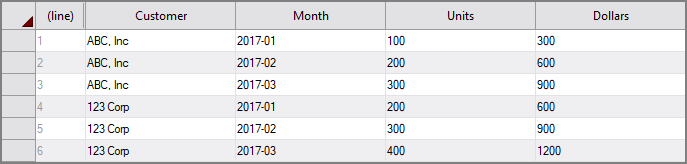
An unrotate node configured as follows:
unrotate "test" {
source "source"
dimension "Customer"
key "Month"
value "Units"
value "Dollars"
}
Returns this output:

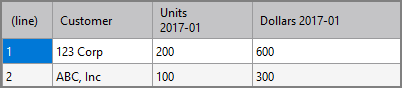
When a key-value of 2017-01 is added, the output remains the same, as that value already exists in the key column Month. When a key-value of 2017-04 is added, the unrotate process returns this output:

If the key-value is changed again to 2017-01 and the sub-tag ignore-other-values is included, the unrotate process returns this output:
out-name
Specifies how other columns are named. The pattern provided must have the placeholder values {key} and {value} in it. Those placeholder values are replaced at run time with data from the specified key tag and value tag columns. The default value of this tag is "{value} {key}". Optional.
prefix
If set, the string you provide is added to the beginning of the name of each output column. Optional.