Spectre Flow Chop Process Object
The Spectre Flow Chop Process object takes an input flow and chops a single column into tokens based on a set of delimiters, returning tokens in separate rows.

The Chop Process object list can be used to parse a sentence into words, or a comma-separated list into individual elements.
TIP: If you need to keep your input column intact for later processing, it is a good idea to create a copy of the column with another name and use that new column as the chop column.
The Chop Process object has three sections in the properties panel where you set attributes.
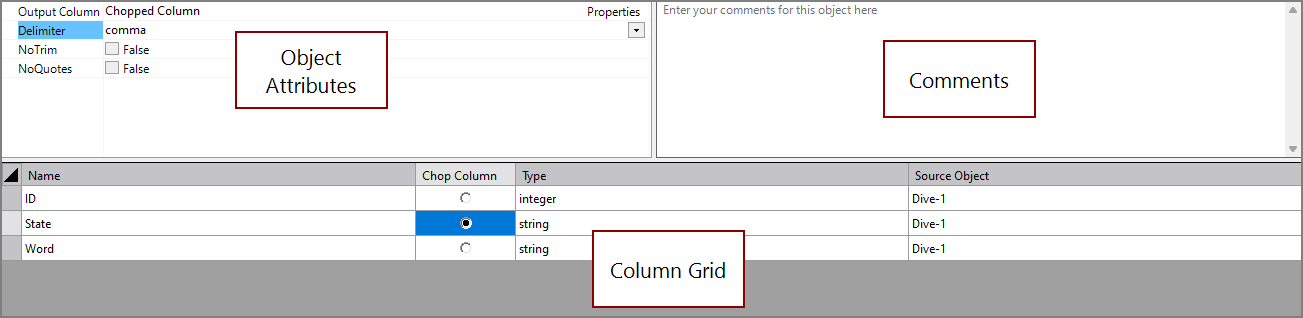
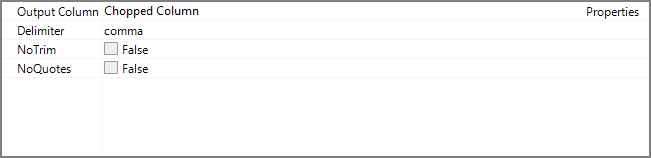
 Object Attributes
You set attributes for the Chop Process object in the object attributes section.
| Attribute | Description |
|---|---|
| Output Column | Specifies a new column to hold the chopped values. For information about the flow script tag, see output-column. |
| Delimiter | Specifies the delimiter character, with the following available values: tab, comma, semicolon, space, pipe. For information about the flow script tag, see delimiter. |
| No Trim | If true, white space is preserved in parsed values. For information about the flow script tag, see no-trim. |
| No Quotes | If true, double-quotes are preserved in parsed values. For information about the flow script tag, see no-quotes. |
Comments
Each object has an area where you can enter comments. It is DI best practice to enter a note for every object in a Spectre Flow script.
Every Spectre Flow node comment area is Markdown-enabled. For more information, see Workbench Markdown Editor.

Column Grid
The Chop Process object column grid section lists the columns from the data flow and is where chop columns are selected.

| Attribute | Description |
|---|---|
| Name | Displays the name of each input column. This attribute is read-only. |
| Chop Column | Indicates whether the column contents are to be chopped into tokens. Select or deselect as needed. |
| Type | Displays the type of each input column. This attribute is read-only. |
| Source Object |
Displays the name (and object type) of the source object. Double-click the Source Object row for a column to change focus to that node. |