Spectre Flow Rotate Process Object
The Spectre Flow Rotate Process object allows you to reorient your data before building the output.

The Rotate Process object has three sections in the properties panel where you set attributes. Depending on the Rotate Mode value (Manual Grid or Automatic Range), the properties panel has a different configuration.
The Manual Grid rotate type view:

The Automatic Range rotate type view:
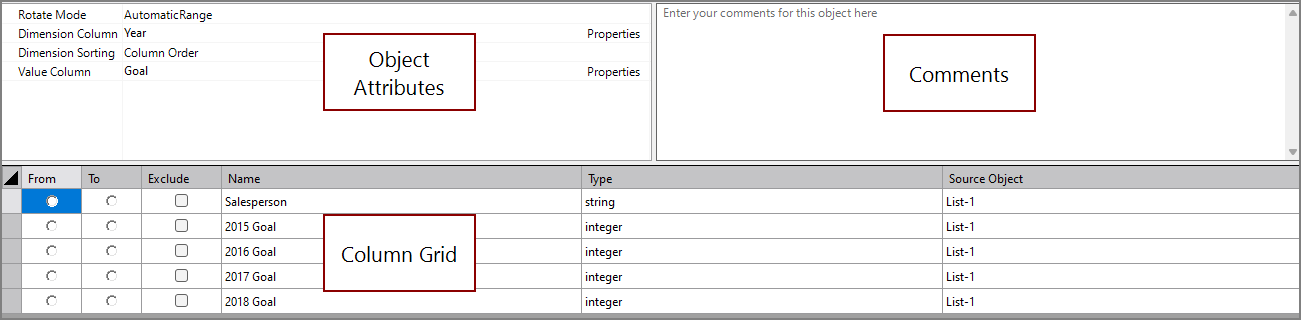
 Object Attributes
You set attributes for the Rotate Process object in the object attributes section.
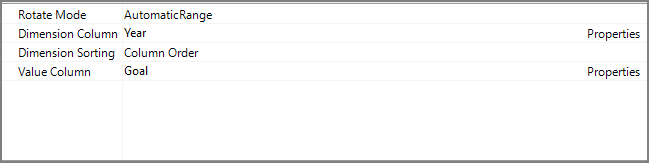
| Attribute | Description |
|---|---|
| Rotate Mode |
Determines how the rotate columns are specified:
For information about the flow script tag, see auto-rows. |
| Dimension Column | Specifies the name of the new dimension column. This column must be unique (it cannot also be the same as the Value Column). For information about the flow script tag, see dimension-column. |
| Dimension Sorting | Determines how the output columns are sorted. For information about the flow script tag, see no-alternate-sort |
| Value Column | Specifies the name of the new value column. This value is only available when the Rotate Mode value is Automatic Range. When the Rotate Mode is Manual Grid, multiple value columns can be specified in the column grid. This column must be unique (it cannot be the same as the Dimension Column). For information about the flow script tag, see value-column |
Comments
Each object has an area where you can enter comments. It is DI best practice to enter a note for every object in a Spectre Flow script.
Every Spectre Flow node comment area is Markdown-enabled. For more information, see Workbench Markdown Editor.

Column Grid - Automatic Range
The Rotate Process object column grid section is where From and To ranges are set for the automatic rotation.

| Attribute | Description |
|---|---|
| From | Identifies the column that starts the column range. |
| To | Identifies the column that ends the column range. |
| Exclude | Excludes the selected column from the rotation. |
| Name | Displays the name of each input column. This attribute is read-only. |
| Type | Displays the type of each input column. This attribute is read-only. |
| Source Object |
Displays the name of the source object for the column. This attribute is read-only. Double-click the Source Object value for a column to change focus to that object. |
Column Grid - Manual Grid
The Rotate Process object column grid section is where value columns are added and defined.

To rotate columns with the manual grid:
-
Name a dimension column in the Dimension Column field in the object attributes.
The dimension column appears in the column grid.
-
Right-click on the column grid and select Add Column from the context menu.
A value column is created.
-
Click the pulldown menu in the value column.
-
Select the columns to rotate from the pulldown menu.
Repeat this process for as many value columns are needed.
Column Properties
To access column properties, select a column from the Column List. The following attributes are common column attributes. For a list of all column attributes, including attributes specific to certain data types, see Spectre Flow Column Tags.
| Attribute | Description |
|---|---|
| Name | Read only attribute displaying the name of the column. |
| Type | Specifies the data type of the column. Available data types are string, integer, double, fixed100, date, datetime, period, and boolean. |
| Sort By | Defines another column to sort by when this column is sorted. For example, setting Month Number as the Sort By column for Month sorts months by their number instead of their alphabetical order (1 (Jan), 2 (Feb), 3 (Mar), etc.). |
| Label | Defines a display name for a column. This name is displayed in ProDiver and DivePort, while calculations and other technical processes use the value in the Name attribute. |
| Required Dimension |
Sets a column to behave like a classic Info Field. In ProDiver, the info field is available as a column that you can add to other columns displayed in a dive. For example, to see the Address column requires that the Customer column is available. Setting a Required Dimension
|
| Suggested Dimension |
Allows you to promote or demote a column.
|
| Comment | Defines a comment that describes this column. |