About the Border Tab
NOTE: You can use the gridlines option in the Report Preferences or Default Report dialog boxes to automatically enclose all rows and cells in the report with a border. However, the cell border options provide a greater degree of granularity than the gridlines option.
You can select all, one, or a mix of columns to add borders, using any combination of the Top (plus Row Top), Left, Right, or Bottom (plus Row Bottom) options.
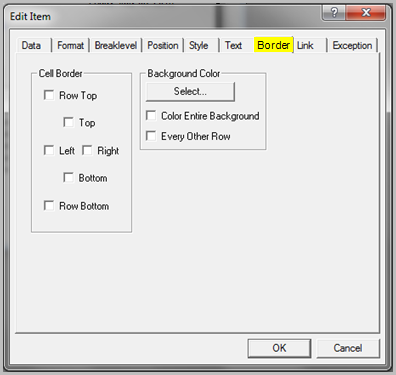
 Cell Border
Use the options in this section to create borders for rows in a column (Row Top and/or Row Bottom), or borders for the text area of selected items, by selecting the Top, Left, Right, or Bottom check boxes. You can select multiple items in a report and use the Cell Border options to highlight or offset specific areas.
Background Color
Use the options in this section to assign a different background color for items. The Select button opens the Color dialog box where you can select a basic or custom color to apply to the background of selected items. You can create different color effects by selecting the Color Entire Background or Every Other Row options.
See also:
- Adding a Background Color to an Item
- Coloring Every Other Row in a Report
- About the Position Tab
- About the Style Tab
- About the Format Tab
- About the Text Tab
- About the Link Tab
- About the Exception Tab