There are multiple ways to run DIAL scripts:
-
From Workbench edit script mode. See Creating a DIAL Script in Workbench.
-
From a Production script. See the DIAL Process Node.
-
From a DI-Broadcast job. See DI-Broadcast Overview.
-
From the command line. See Running DIAL Outside Workbench.
Each way connects to a DiveLine server to access centrally located cBases, Models and Markers.
 Connecting to DiveLine
DIAL accesses information by connecting to a DiveLine server to make requests. A DiveLine service must be installed and operational for DIAL to function. The DiveLine license must contain language specific to DIAL. DIAL does not need to be installed on the same server as DiveLine.
To see what DiveLine servers are available on a Windows machine, use di-service -list from the command line.
To have access to DIAL, a Platform user needs to be configured as either a Developer or a ProDiver user in Workbench Server Settings. See Managing Diver Platform Licenses. A DiveLine Administrator user always has access to DIAL, but a non-Administrator user must have Developer access to the project to use DIAL.
A Solution user needs to be configured as either a Developer or an Advanced user. See Managing Diver Solution Licenses. A DiveLine Administrator user always has access to DIAL, but a non-Administrator user must have Developer access to the project to use DIAL.
If the user running DIAL does not have the appropriate licensing and project access settings, the script fails and returns an error code.
Adjusting the Heap Space
Heap space in Java is used for dynamic memory allocation for Java objects and JRE classes at runtime. Since DIAL is a Java application, depending on your system and your data, you may find that you are running out of heap space. There are resources online that describe how to alter the default memory limit using the -Xmx parameter. However, for the Diver Platform environment, you may need to adjust your approach. Here are two examples.
Example 1
Write a wrapper script that invokes Java the way you want on your server. This will apply to every DIAL script called from DI Production or Workbench. For example, on Linux:
java-for-dial.sh:
#!/bin/sh
java -Xmx2048m "$@"
Mark the script as executable, and be sure to set the Java executable in Server Settings > Advanced to this new wrapper script.
(Optionally specify full path to Java if not on the PATH environment variable.)
Example 2
Set the environment variable that Java looks for to get overrides:
JAVA_TOOL_OPTIONS
with value
-Xmx2048m
You could set this in a Productions script with a Parameter Node. That way, you can adjust the heap size only for scripts that require the extra memory.
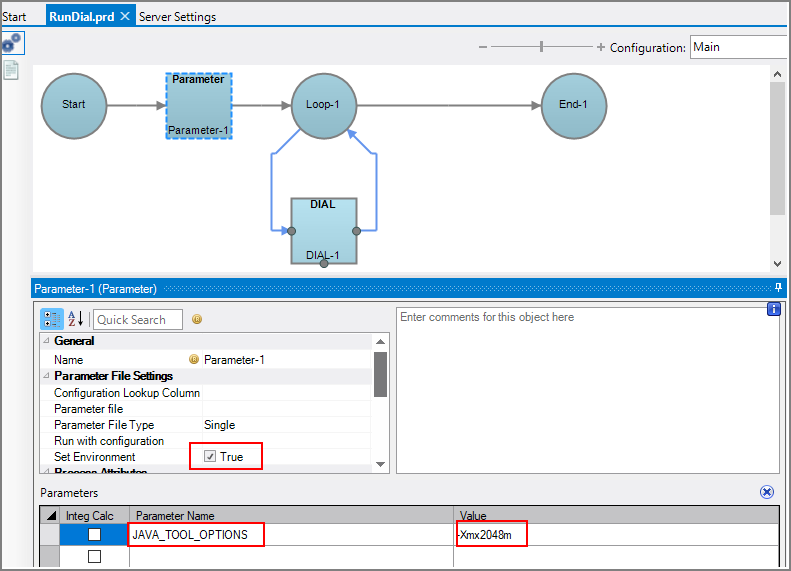
The setting is shown in the DIAL node results.
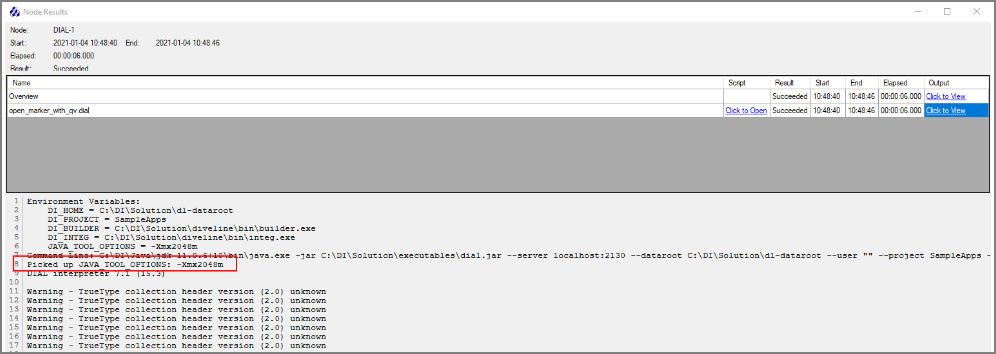
You could also set this globally, or (on Linux) in the initscript or systemd unit file that starts DiveLine.
For example, in the Linux initscript distributed with the Platform software:
Find the line that says:
PREPCMDS=""
Change to:
PREPCMDS="export JAVA_TOOL_OPTIONS=-Xmx2048m;"
Restart the DiveLine service.
Look up the di-service PID and check /proc/#####/environ to see if it was effective.