DIAL scripts can be created and tested in Workbench, as long as the cBases, Models, and markers you reference exist and are saved in the project. Once tested, DIAL scripts can be included in a Production job by using the DIAL Process Node.
To create an example DIAL script in Workbench that opens a cBase, use the following procedure..
-
Open your Workbench project.
-
Right-click the programs folder, and select New > DIAL Script.
A blank dial script opens.
-
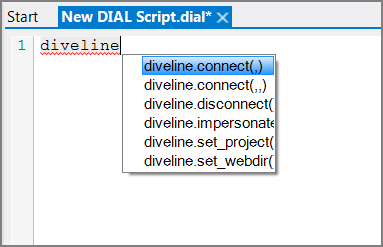
Enter "diveline" and press Ctrl+Space to open the
 auto-complete menu of possible functions and attributes.
 -
Select diveline.connect(,,) and specify the server, user name, and password. Add a semicolon (;) to the end of the line. For example:
diveline.connect("docs.dimins.com:2130","dial_user","dial_user_pw");
-
On a new line, enter diveline.set_project(); and include the project name in quotation marks. For example:
diveline.set_project("MyProject");
-
On a new line, use the console.writeln(); function to print what the script is doing. This is not necessary, but it is helpful. For example:
console.writeln("Reading Produce cbase...");
-
On a new line, type the command that you want the script to carry out. In this example, we want to open a model, so we type the model.open(); function and include the object variable mymodel and the name of the model in quotation marks:
model.open(mymodel, "/cbases/produce.cbase");
-
On the next line, type the console.writeln(); function to output a comment that the task is complete. This is not necessary, but can be helpful. For example:
console.writeln("Done!");
-
End your script by disconnecting from the server:
diveline.disconnect();
-
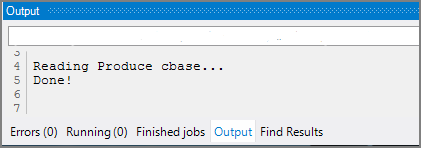
When you are finished, run a test by selecting Run > Run from the menu, or by clicking the green arrow icon in the toolbar. If your script does not run correctly, check the Output tab that is located at the bottom of the screen. The following image shows the output from a successful run of this script.
NOTES:
- Always begin your script by connecting to the server you are working with. Use the following syntax:
- diveline.connect("<servername>", "<username>");
- Always end your script by disconnecting from the server:
- diveline.disconnect();
- Each line or statement must end with a semicolon.
- If you see a red squiggly line under a line in your script, that line contains an error that you must fix before the script can run properly.
See also: