You can save the formatting for any report as a template file (default.rep), which you can then apply to a dive window by clicking Load Template in the Default Report dialog box. To save a report as a template file, click File > Save Report Template.
Because ProDiver saves report attributes as a set of objects, an individual report template can contain a number of formatting objects that might not be entirely compatible with a dive to which you want to apply an existing template. Therefore, before ProDiver applies an existing report template to a dive window, it compares the following attributes in the dive window to the template to determine the level of compatibility:
- Tabular type (Tabular, MultiTab, CrossTab)
- Number of Breaklevels
- Number of Summaries
- Number of Info Field Columns
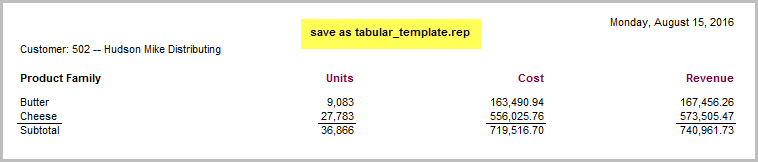
Depending on the level of compatibility, ProDiver may or may not apply a report template to an open dive window.  save a simple tabular as a report template called tabular_template.rep.
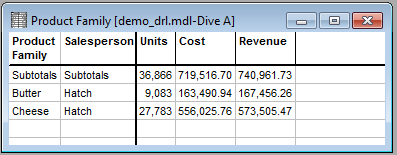
To illustrate how ProDiver tests compatibility, create a dive window identical to the template except that it contains a multitab column labeled Salesperson.
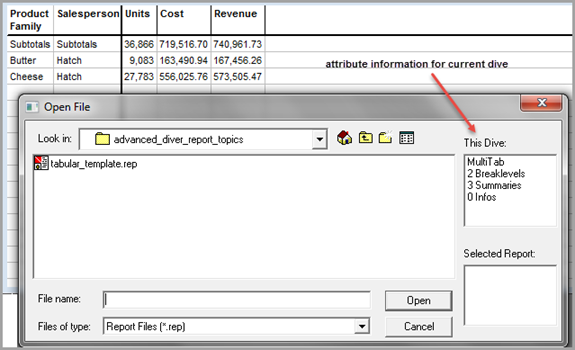
To apply the report template, open the Default Report dialog box, and click Load Template to display the Open File dialog box with the attribute information about the current dive.
To complete the comparison, select the template file name (tabular_template.rep) in the Open File dialog box to display information about the template report and the level of compatibility.
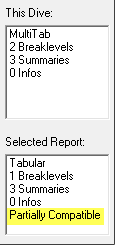
Before you apply the template file to the contents of the dive window, ProDiver shows the criteria used to determine the level of compatibility and provides a compatibility score enabling you to decide whether or not you wish to apply the template. In this example, the compatibility ranking is Partially Compatible because the tabular styles are different (tabular versus multitabular) and the dive contains two breaklevels and the template only one.
There are four levels of compatibility:
- Compatible—Tabular displays are of the same type, have the same number of breaklevels, summaries, and Info fields. Info fields are associated with the same breaklevel dimensions.
- Mostly Compatible—Tabular displays are of the same type and have the same number of breaklevels, but the number of summaries and/or Info fields are different (or the Info fields are associated with different breaklevels).
- Partially Compatible—Tabular display types are compatible but the number of breaklevels are different.
- Not Compatible—Tabular display types are not compatible. For example, the report template is a CrossTab or MultiCrossTab, and the current dive is not. ProDiver concludes that the template and dive are Not Compatible and will not apply the report template.
You can apply a Mostly or Partially Compatible report template, but the final report might require you to make additional formatting changes. If you save the final report as a marker, the marker contains all the changes that you made to the report after applying the report template.
See also: