DivePort AI Settings
As of DivePort 8.0(11), you can integrate AI workflows and LLMs with DivePort using the AI settings menu. To access AI settings, select ADMIN > Portal Settings > AI Settings.

The AI Settings dialog box opens.
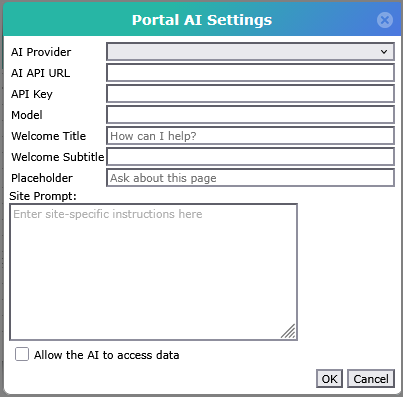
| Property | Definition |
|---|---|
| AI Provider |
Defines the type of AI being used. Options are OpenAI, Anthropic, Ollama, Azure Open AI, and Mistral. |
| AI API URL | Defines the API URL for your AI provider. This URL can be found in the provider's API documentation. For example, the OpenAI URL might be https://api.openai.com/v1 and the Anthropic URL might be https://api.anthropic.com/v1. |
| API Key | Defines the private key generated by your AI provider. |
| Model | Defines the model to use with your AI provider. For example, gpt-4o or claude-opus-4-6. |
| Context Window | Defines the number of tokens allowed in the context window of a conversation with the DivePort AI. If a conversation uses more tokens than are defined in the context window, the conversation ends. |
| Data Access |
Defines the degree to which DivePort AI can access and read data. By default, DivePort will not reveal any data values to the AI. If the Metadata option is selected in this field, then select metadata is provided, such as: portlet settings, project names and paths, dimension and measure names, and descriptions of fields. The AI does not have access to the calculated values or to dimension values. To enable that kind of data access, this field must be set to Full. Options are: None, Metadata Only, and Full. |
| Allow environment, pages, and portlets to grant more access than this. |
When the value in the Data Access field is not Full, select this checkbox to enable individual environments, pages, and portlets to provide more data to the DivePort AI. |
| Welcome Title | Defines the message displayed to users when they open the chat window for the first time. |
| Welcome Subtitle | Defines the subtitle displayed to users when they open the chat window for the first time. |
| Placeholder | Defines the placeholder text in the chat textbox. |
| Site Prompt | Defines the site-specific prompt to help customize your AI implementation. This prompt is included in addition to the stock prompts. |
| Debug Mode | Select this checkbox to have the chat display information about the input, output, and any process or tools used as the DivePort AI formulates an answer. |
| MCP Servers | Lists all configured MCP servers for the DivePort portal. See Configuring MCP with DivePort AI. |