Integrator functionality is controlled by the execution of DI-Object Language scripts. To effectively use Integrator you must understand the objects defined by these scripts. This topic describes the concept of objects and how it affects the flow of data.
Visual Integrator uses these same concepts with a GUI (see Visual Integrator Task List and Task Objects).
The DI Object Language provides a general method to represent complex objects to Integrator as well as to other DI applications. These objects contain attributes and values that define the behavior of the application. They define:
- Integrator tasks
- Input data source(s)
- Processes to be performed
- Data manipulation(s)
- Output destination for the transformed data
Data Flow
When developing a script, you create a sequence of data flows. A data flow consists of objects that manipulate data. A data flow is a collection of columns of information flowing like water through pipes in which various objects manipulate this flow. A script may contain multiple flows.
The data flow structure provides a way of thinking about data manipulation in a flexible and modular way. Imagine data traveling in flows, moving from inputs to outputs like water through pipes. Along the way, the designer places various fittings and mechanisms to manipulate the data. By combining a few basic mechanisms, you can accomplish a wide range of complex tasks. The modular nature of the flow allows new functionality to be added by defining new mechanisms.
The data flow is defined by reverse order starting from the output object. The output object specifies an input. This input is the object immediately preceding the output in the flow and may be an input object or a process object. Process objects also specify one or more inputs which may be inputs or other process objects. The sequence of objects is defined by the inputs listed in each process and output object in the flow. To trace a data flow, start at the output object and find its input, then find that object’s input. Trace back all paths until they each end in an input object to see the complete data flow.
For details on the object types, see Workbench Tools > Visual Integrator > Integrator Reference in the table of contents.
A flow is made up of various objects as shown  here.
here.
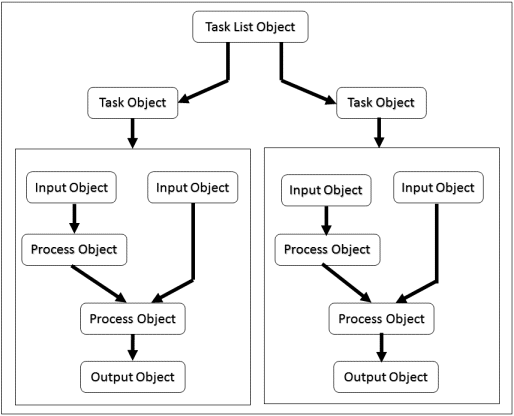
Objects
The high-level flows and mechanisms that make up a data flow are represented in terms of objects. An object is a container of information that stores variables and has the following properties:
- Object Type—Every object has a type associated with it that identifies the kind of object it is, or the kind of information it stores. Integrator recognizes six data flow object types identified by four-letter strings contained within single quotes as described in the table below.
- Object Name—Each object is identified by a unique, user-provided name. Object names are unique within each type.
- Named Attributes—The actual information that defines an object is stored as a set of attributes. An attribute consists of a name and a value. The attribute name specifies what information is being defined, while the attribute value is the actual information. Objects store a variable amount of information that can be expanded by using new attributes. Attribute values can be items such as numbers or strings, or complex structures such as arrays or sub-objects.
| Type | Description |
|---|---|
| TSKL | Task List Object—Defines the tasks that are to be performed. The TSKL object is required. One or more tasks can be performed within a task list. A script can have one or more task list objects. The Task List object always has a name of Main. |
| TASK | Task Object—Takes data from one or more input objects and combines them together to form a single output object. It can contain a number of input objects, a number of process objects, and at most, one output object. At least one TASK object must be defined in a script. One or more tasks can be performed by a single execution of an Integrator script. |
| INPT | Input Object—Defines sources of data. These can be files of various formats, SQL databases, constant tables, or user-defined lists. A script can contain any number of Input objects or none at all. |
| PROC | Process Object—Manipulates the data flow by controlling and filtering the data before it passes to an Output object. The filters to control the data that passes through include functions such as lookup tables that expand data columns, joins that merge multiple data objects together, sorts that reorder data, and calculations that transform data. Multiple Process objects are allowed. |
| OUTP | Output Object—Directs the output into a file or some other repository where it can be used by another application. Only one Output object is allowed per task. |
| PARM | Parameter Object—Stores various user-defined variable substitutions (i.e., parameters) that allow the developer to create flexible scripts. Parameters can receive values external to the script at execution time. The PARM object is optional. |
Working with Scripts
Keep the following points in mind when working with scripts:
- A script contains one or more data flows.
- A data flow consists of a combination of objects that manipulate data. These objects include: Task List, Task, Input, Process, and Output objects.
- Objects can exist in the script but not be part of the data flow.
-
Each script contains at least one task list object, named Main.
- Each task list contains one or more task objects.
- Each task consists of a combination of input, process and output objects.
-
Each task can include up to 1,000 objects.
- A script can only have one parameter object. Within the parameter object, you can have multiple parameter sub-objects.