Spectre Flow Editor Interface
The Spectre Flow Editor interface supports the graphical creation of process and data flows and allows you to test and run individual objects or complete scripts.
Numbers in the following text refer to the numbers in the sample screen.
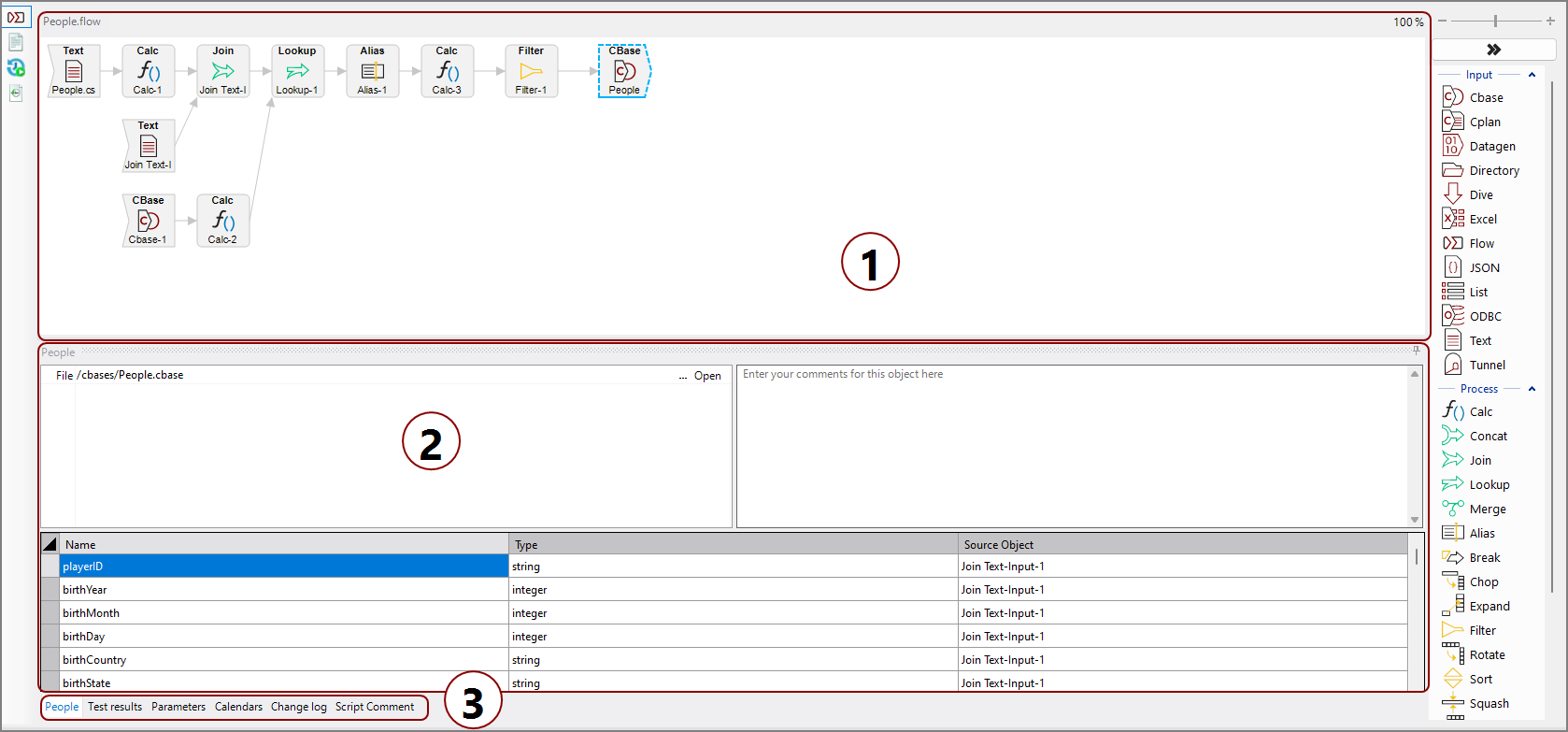
The Spectre Flow interface consists of:
-
Flow pane—The flow pane is where each node is placed and connected. This is a visual representation of the underlying flow script.
-
Properties pane—The properties pane is where attributes and properties are set for the selected node.
-
Additional tabs—The additional tabs are as follows:
-
Node view—The node view is the default view of the properties pane.
-
Test results—The test results view shows a history of test runs and the results of each run.
-
Parameters—The parameters tab is where script-wide parameters can be created, edited, and deleted.
-
Calendars—The calendars tab is where calendars can be created, edited, and deleted.
-
Change log—The change log displays when each change to the script has been made and by whom. The change log does not log what the change was, for a full accounting of what has changed in a script, see About Version Control.
-
Script comment—The script comment tab is where script-level comments can be made and viewed.
-