Spectre Flow Text Output Object
The Spectre Flow Text Output object specifies the location for the text file output.

The Text Output object has two sections in the properties panel where you set attributes.

 Object Attributes
You set attributes for the Text Output object in the object attributes section.
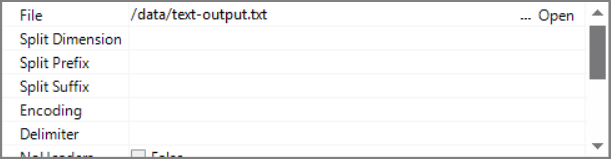
| Attribute | Description |
|---|---|
| File | Defines the name and path of the file that this object creates. Enter a path and file name in the File box, or use the browse button to select the file. For information about the flow script tag, see file. |
| Split Dimension | Defines the dimension to use when creating split files. If defined, the output data is split into a set of files determined by the contents of the data. For example, splitting a file based on a dimension called YesNo containing either "Yes" or "No" values, splits into two text files: Yes.txt and No.txt. The values in any other columns are output as well as part of the split files. For information about the flow script tag, see split-file. |
| Split Prefix | Sets the prefix for the split file name. This prefix can include a file path if you want the file to output to a specific folder. |
| Split Suffix | Sets the suffix of the split file name. This suffix can include a file type. For example, .txt. If you do not provide a file type in the suffix field, a file type will not be given to the output split file. |
| Encoding |
Defines the encoding for the output file(s). Values include:
UCS-2 and UTF-8 files can include a Byte Order Mark (BOM) at the beginning of the file to denote the file encoding. These file signatures are defined as follows:
File signatures are common for Unicode files on Windows operating systems. If the file input object reads multiple files, the signature of each file determines its encoding. If the encoding attribute is auto and no signature is found, the encoding is assumed to be latin1 if no other object in the task handles Unicode data and the file is not encoded as utf-8 (using the charset 1208 directive). Otherwise, the encoding is assumed to be utf-8. See also Integrator Unicode Data Support. For information about the flow script tag, see encoding. |
| Delimiter |
Specifies the delimiter that is used to separate columns for variable format files. If not specified, ASCII tab is used. Choices are:
For information about the flow script tag, see delimiter. |
| No Headers | If true, the header line is omitted in the output. For information about the flow script tag, see no-headers. |
| Only if Different | If true and a file with the same name and file path as File exists, then the existing file is only overwritten if there is a difference between the existing file and the output file. For information about the flow script tag, see only-if-different. |
| Append | If true, the output is appended to the file. By default, headers are still included unless No Headers is true. For information about the flow script tag, see append. |
| No Quotes | If true, string values containing quotation marks are not output with additional quotation marks. For example, a row value of John "Jim" Doe is given wrapping quotes when No Quotes is false, and the output is "John ""Jim"" Doe". When No Quotes is true, the output is John "Jim" Doe. For information about the flow script tag, see no-quotes. |
| Use Format | If true, all column formatting from previous nodes is retained and used when the data is output. If false, default formatting applies. For example, a date with a custom format of MM-YYYY is only output with that format when Use Format is true. Otherwise, the date is formatted using the default format of YYYY/MM/DD. For information about the flow script tag, see use-format. |
Comments
Each object has an area where you can enter comments. It is DI best practice to enter a note for every object in a Spectre Flow script.
Every Spectre Flow node comment area is Markdown-enabled. For more information, see Workbench Markdown Editor.

Column Grid
The Text Output object column grid section lists the columns to output.

| Attribute | Description |
|---|---|
| Name | Displays the name of each input column. This attribute is read-only. |
| Type | Displays the type of each input column. This attribute is read-only. |
| Source Object |
Displays the name of the source object for the column. This attribute is read-only. Double-click the Source Object value for a column to change focus to that object. |