Spectre Flow ODBC Output Object
The Spectre Flow ODBC Output object exports the output of a flow script to an Open Database Connectivity (ODBC) data source. A table in the ODBC data source is specified and an INSERT operation runs to add the output data to that table.

The ODBC Output object has two sections in the properties panel where you set attributes.

 Object Attributes
You set attributes for the ODBC Output object in the object attributes section.
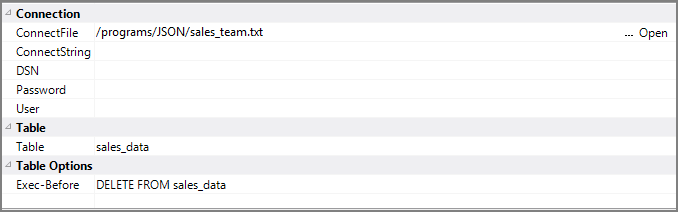
| Attribute | Description |
|---|---|
|
Connect File |
Specifies a binary file from which to retrieve credentials. This assumes that you previously generated a connect file using Integrator. For example: echo "DSN=my-dsn;UID=my-user;PWD=my-password" | integ -save_connect_file my_connect_file.connect
This attribute cannot be used if Connect String or the combination of DSN, User, and Password are populated. For information about the flow script tag, see connect-file. |
|
Connect String |
Specifies, using one tag, a string with DSN, user, and password. For example: "DSN=my-dsn;UID=my-user;PWD=my-password" NOTE: Different ODBC drivers might use other connect string formats. This attribute cannot be used if Connect File or the combination of DSN, User, and Password are populated. For information about the flow script tag, see connect-string. |
| DSN |
Specifies the data source name (DSN) for the ODBC data. A DSN is a data structure that contains the information about a specific database that an ODBC driver needs in order to connect to it. This attribute must be used in combination with the User and Password attributes. For information about the flow script tag, see dsn. |
| Password | Specifies the user password to access the ODBC data source. This attribute must be used in combination with the DSN and User attributes. For information about the flow script tag, see password. |
|
User |
Sets the user to access the ODBC data. This attribute must be used in combination with the DSN and Password attributes. For information about the flow script tag, see user. |
| Table | Specifies the name of the table in the ODBC data source into which the Flow output is inserted. For information about the flow script tag, seetable. |
| Exec-Before | Specifies a SQL query that runs before the INSERT query runs. This can include queries such as a DELETE FROM to clear the table before inserting the Flow output, an UPDATE statement, or another INSERT statement. For information about the flow script tag, see exec-before. |
Comments
Each object has an area where you can enter comments. It is DI best practice to enter a note for every object in a Spectre Flow script.
Every Spectre Flow node comment area is Markdown-enabled. For more information, see Workbench Markdown Editor.

Column Grid
The ODBC Output object column grid section lists the columns to output.

| Attribute | Description |
|---|---|
| Name | Displays the name of each input column. This attribute is read-only. |
| Type | Displays the type of each input column. This attribute is read-only. |
| Source Object |
Displays the name of the source object for the column. This attribute is read-only. Double-click the Source Object value for a column to change focus to that object. |