Spectre Flow Datagen Input Object
The Spectre Flow Datagen Input object generates data sets with randomized values.

The Datagen Input object has four sections in the properties panel where you set attributes.
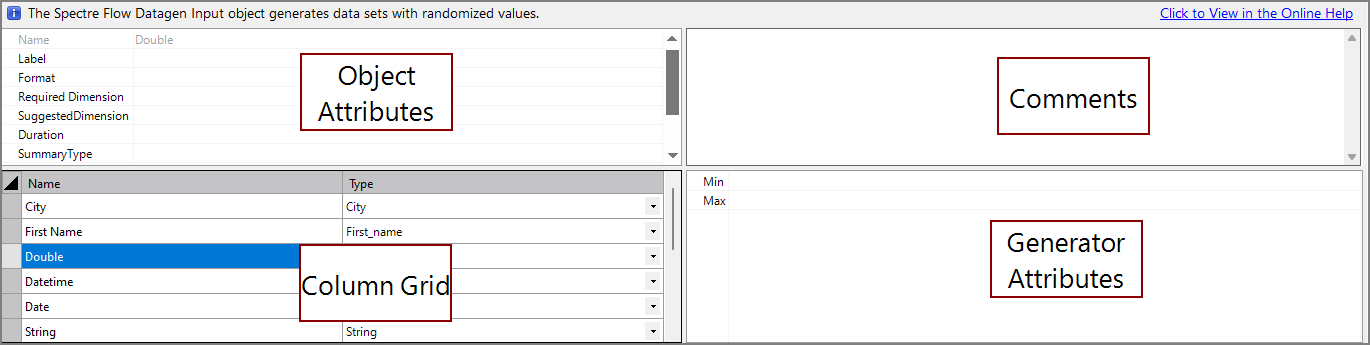
 Object Attributes
You set attributes for the Datagen Input object in the object attributes section.

| Attribute | Description |
|---|---|
| Count | Specifies how many rows of data are generated. Required. For information about the flow script tag, see count. |
| Seed | Sets a numerical seed for the generators. This allows generators to generate the same data every time (as long as the seed stays the same). Optional. For information about the flow script tag, see seed. |
| Current Date | Specifies the current day for time-series calculations and Analysis Tables. The value of this attribute must follow the default DI date formatting of "YYYY/MM/DD". It is DI best practice to pass a parameter with the current date value to this attribute rather than writing the value directly in the attribute. The default current date is today(). |
| Date Dimension | Specifies the name of the date dimension. This dimension is used in time-series calculations and Analysis Tables. |
| Extract Timestamp | Defines a timestamp value for later use in ProDiver. The timestamp value is accessed in ProDiver using the $EXTRACT_DATE and $EXTRACT_TIME macros. It is DI best practice to pass a parameter with the extract timestamp value to this attribute rather than writing the value directly in the attribute. |
Column Properties
To access column properties, select a column from the Column List. The following attributes are common column attributes. For a list of all column attributes, including attributes specific to certain data types, see Spectre Flow Column Tags.
| Attribute | Description |
|---|---|
| Name | Read only attribute displaying the name of the column. |
| Type | Specifies the data type of the column. Available data types are string, integer, double, fixed100, date, datetime, period, and boolean. |
| Sort By | Defines another column to sort by when this column is sorted. For example, setting Month Number as the Sort By column for Month sorts months by their number instead of their alphabetical order (1 (Jan), 2 (Feb), 3 (Mar), etc.). |
| Label | Defines a display name for a column. This name is displayed in ProDiver and DivePort, while calculations and other technical processes use the value in the Name attribute. |
| Required Dimension |
Sets a column to behave like a classic Info Field. In ProDiver, the info field is available as a column that you can add to other columns displayed in a dive. For example, to see the Address column requires that the Customer column is available. Setting a Required Dimension
|
| Suggested Dimension |
Allows you to promote or demote a column.
|
| Comment | Defines a comment that describes this column. |
Comments
Each object has an area where you can enter comments. It is DI best practice to enter a note for every object in a Spectre Flow script.
Every Spectre Flow node comment area is Markdown-enabled. For more information, see Workbench Markdown Editor.

Column Grid
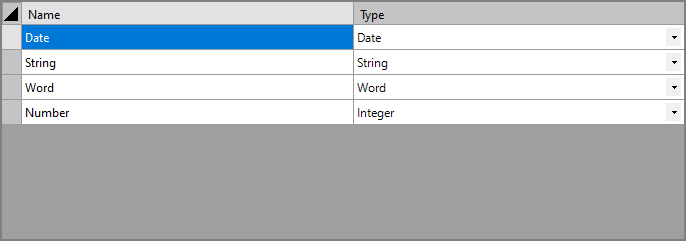
The Datagen Input object column grid section is where you create generator columns.
| Attribute | Description |
|---|---|
| Name | Specifies the name of each column. |
| Type | Specifies the type of generator for each column. |
Generator Attributes
Date
The Date generator has the following attributes:
-
Min—The earliest possible date that can be generated.
-
Max—The latest possible date that can be generated.
For information about the flow script tag, see date.
Datetime
The Datetime generator has the following attributes:
-
Min—The earliest possible datetime that can be generated.
-
Max—The latest possible datetime that can be generated.
For information about the flow script tag, see datetime.
Double
The Double generator has the following attributes:
-
Min—The lowest possible double that can be generated.
-
Max—The highest possible double that can be generated.
For information about the flow script tag, see double.
First Name
The First Name generator has no attributes.
For information about the flow script tag, see first-name.
Fixed100
The Fixed100 generator has the following attributes:
-
Min—The lowest possible fixed100 that can be generated.
-
Max—The highest possible fixed100 that can be generated.
For information about the flow script tag, see fixed100.
Integer
The Integer generator has the following attributes:
-
Min—The lowest possible integer that can be generated.
-
Max—The highest possible integer that can be generated.
For information about the flow script tag, see integer.
Last Name
The Last Name generator has no attributes.
For information about the flow script tag, see last-name.
Sequence
The Sequence generator has the following attributes:
- Start—The first number in the sequence. The default start value of the sequence is 1.
-
End—The last number in the sequence. If the number of the rows in the output is greater than the number entered as the end value, the sequence begins again at the start value.
For information about the flow script tag, see sequence.