Spectre Flow cBase Output Object
The Spectre Flow cBase Output object specifies the location for the cBase output.

The cBase Output object has two sections in the properties panel where you set attributes.

 Object Attributes
You set attributes for the cBase Output object in the object attributes section.
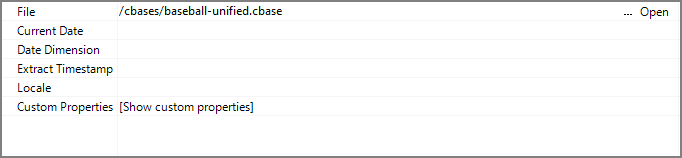
| Attribute | Description |
|---|---|
| File | Defines the location and file name for the cBase output. If the output path string is more than a file name, then the target sub directory must already exist relative to the current working directory. If the cbase extension is not supplied, it is automatically appended at runtime. For information about the flow script tag, see file. |
| Current Date | Specifies the current day for time-series calculations and Analysis Tables. The value of this attribute must follow the default DI date formatting of "YYYY/MM/DD". It is DI best practice to pass a parameter with the current date value to this attribute rather than writing the value directly in the attribute. The default current date is today(). |
| Date Dimension | Specifies the name of the date dimension. This dimension is used in time-series calculations and Analysis Tables. |
| Extract Timestamp | Defines a timestamp value for later use in ProDiver. The timestamp value is accessed in ProDiver using the $EXTRACT_DATE and $EXTRACT_TIME macros. It is DI best practice to pass a parameter with the extract timestamp value to this attribute rather than writing the value directly in the attribute. |
Comments
Each object has an area where you can enter comments. It is DI best practice to enter a note for every object in a Spectre Flow script.
Every Spectre Flow node comment area is Markdown-enabled. For more information, see Workbench Markdown Editor.

Column Grid
The cBase Output object column grid section lists the columns to output.

| Attribute | Description |
|---|---|
| Name | Displays the name of each input column. This attribute is read-only. |
| Type | Displays the type of each input column. This attribute is read-only. |
| Source Object |
Displays the name of the source object for the column. This attribute is read-only. Double-click the Source Object value for a column to change focus to that object. |