The Integrator Unrotate process object performs the opposite transformation of the Rotate object. The Unrotate object reconfigures multiple rows of an input flow data into a single row of an output flow by creating additional horizontal columns and assigning the value columns based on a dimension value. The former horizontal column (which is used to select the new horizontal output columns) and the former value columns are no longer available in the output. Instead, the input values are stored in a single output row, with each column representing a combination of the horizontal column and another non-dimension column.
For example, suppose we want to represent sales units and sales dollars by month. In the input flow, there are two columns - Units and Dollars, as well as a column for Month and a column for Customer. We will treat the Month column as the horizontal column. The Customer column is a dimension column. This approach requires 12 rows to represent  12 months of data.
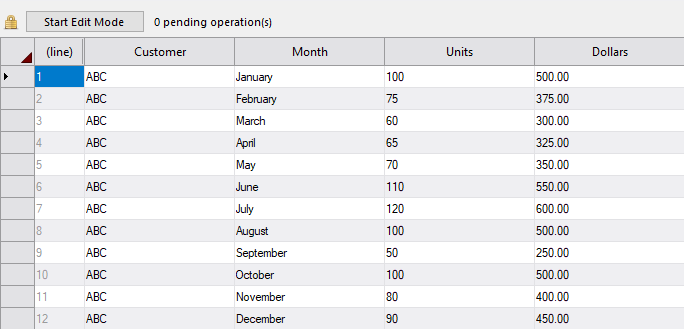
By unrotating this input flow, this data is represented as a single row with 24 columns.

There are 12 columns (one per month) for Units and 12 columns for Dollars. Each column has a unique name that corresponds with the associated month. Since the Customer column is a dimension, it scans the input row for any values that are identical (in this case, all 12 rows have an identical Customer value), and puts all associated values in one output row for that dimension.
It is good practice to examine the data before and after an Unrotate process. For example, use Trace attributes to verify that the input data flow and output data flow is as expected. Sorting the data is also a best practice.
Unrotate Attributes
| Attribute | Type | Description |
|---|---|---|
| process_type (required) |
String | Identifies the object as an Unrotate process object. The value of this string is "unrotate". |
| input (required) |
String | Defines the object from which the data flow is arriving. |
| horiz_column (required) |
String |
Defines the input column that contains a set of predefined values that determine the set of output columns which should receive the value columns of the current row. NOTE: This attribute is Hor. Column in Visual Integrator. |
| value_columns (required) |
Array of Strings | Defines the input columns that contain values to be distributed among the new horizontal columns in the output, based on the value in the horizontal column. |
| horiz_values | Array of Strings | Identifies values from the column in the input flow listed in the horiz_column attribute that should be unrotated to the associated column(s) in the new_horiz_columns array. The number of strings in this array must match the number of rows in the new_horiz_columns array. This attribute is required unless the new_columns_list_input attribute is defined. |
| new_horiz_columns | Array of Strings or Array of Arrays of Strings | Defines new output columns that are added by the Unrotate object. These columns contain data from the value columns in the input flow, as determined by the value in the horizontal column. Each row in the array defines the set of columns that receive values if horiz_column contains the
corresponding value in the horiz_value array. If there is only one value column, the row can be a single string. Otherwise, the row is an array of output column names, specifying output value columns in the same order as the value_columns array. This attribute is required unless the new_columns_list_input attribute is defined. The attributes new_horiz_columns and new_columns_list_input are mutually exclusive in an Unrotate object. |
| new_columns_list_input | String |
Specifies a separate input flow used to define the horizontal values and new horizontal columns. This is an alternative method of defining the horiz_values and new_horiz_columns attributes programmatically. This input flow is required to have the column named "horiz_value" (which defines horizontal values), and a column with the same name as each value column in the value_columns array (which defines the names of the new columns to be created). All other columns in this input flow are ignored. NOTE: This attribute is New Columns List Input in Visual Integrator. |
| dimensions | Array of Strings | Defines the input columns that are used to detect identical rows in the input to unrotate into a single output row. If the Dimension values match between two adjacent rows, the values are stored in the same output row (unless values for the same set of horizontal columns are given). If not used, all non-value columns are used to detect identical rows. |
| warn_limit | Integer |
Controls the number of unexpected value warnings displayed. By default, this limit is one. After the limit is exceeded, Data Integrator issues the message: The warn_limit can be set to 0, but if it is, no warning information will be provided. This setting should be used with caution. NOTE: This attribute is Warn Limit in Visual Integrator. |
| trace_after | Sub-object | Traces data flows leaving the specified object, which makes debugging scripts easier. This is equivalent to adding a Trace process object immediately after the current object. See Embedded Trace Object for more on using trace sub-objects. |
| trace_before | Sub-object | Traces data flows entering the specified object. This is equivalent to adding a Trace process object immediately before the current object. See Embedded Trace Object for more on using trace sub-objects. |