The Spectre Build Flow Editor is a GUI that allows you to create Spectre Build scripts with a visual representation of nodes similar to how Visual Integrator works. Within each object you can set attribute properties, add parameters, and write comments. The Spectre Build Flow Editor allows you to test and run individual objects or overall task flows. For more information about performing actions in the editor, see Working with the Spectre Build Editor.
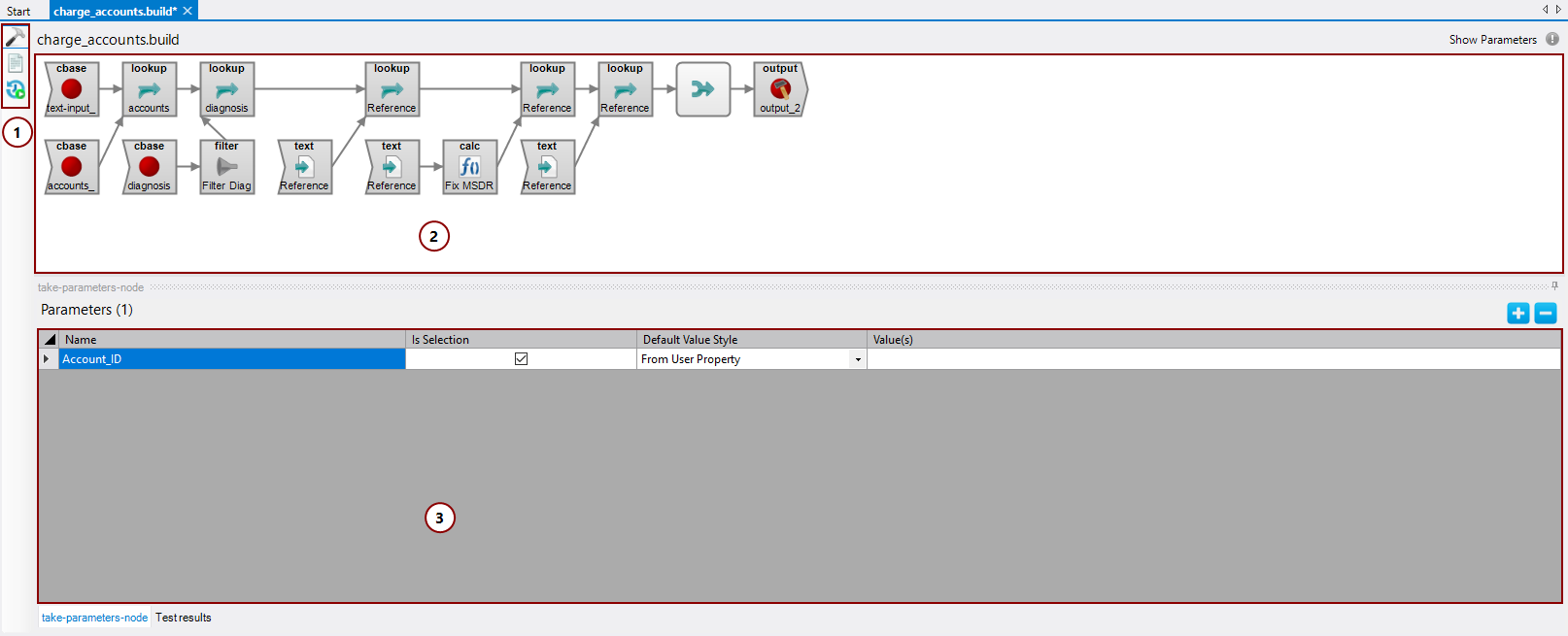
The Spectre Build Flow Editor interface consists of:
-
Editor view options—The editor view options give you the ability to switch between viewing your Spectre script visually (Spectre Build Flow Editor option), as a script (Text Editor option), or seeing a history of Spectre script runs (Run History option).
-
Task flow pane—The task flow pane is where you assemble your Spectre build flow.
-
Properties pane—Displays details about a selected object. The properties pane changes depending on which object you select. By default, the properties pane is empty until you select a node or click Show Parameters.