ProDiver allows proxy login with the credentials of other users so that a developer can test that user's view of the data. All access control rules are applied. This includes access to data as well as read/write access to folders.
NOTE:
- A DiveLine administrator can proxy in as a user in ProDiver, even if that user is not configured as a ProDiver user for a Diver Platform license.
The example here uses a cBase and is the same procedure for all ProDiver file types (cBase, cPlan, DivePlan, Models, and Markers).
To proxy login to ProDiver from a Workbench Explorer cBase:
-
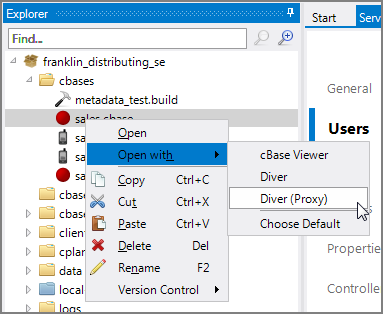
Right-click the cBase in Workbench Explorer, and select
 Open with > Diver (Proxy).
The
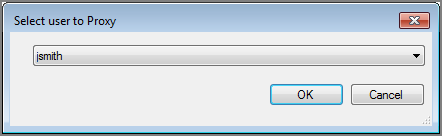
Select user to Proxy dialog box opens. -
Select a user from the list to proxy in as, and click OK.
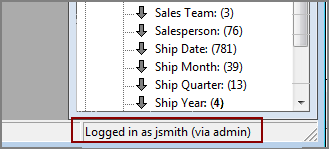
The cBase opens in ProDiver with the proxy user's credentials as displayed in the
ProDiver status bar.The data available for display is limited by the proxy user's access settings.