Some production scripts have dependencies such as a requirement that script B cannot run at the same time as script A. You can use trigger files to indicate if production scripts are running or have completed. For example:
-
At the beginning of script A, add a Trigger node that shows that the script is running.
-
Next, run the job.
-
When the job completes, use a delete node to delete the running trigger.
-
Add another Trigger node to show that the script is complete.
Because script B cannot run while script A is running, its dependency can determine if script A is running, and if so, script B does not start until script A completes.
Click the following link to download a Sample Project that uses trigger files. You can use this project to duplicate the production script used in the examples on this page.
 How to Use the Sample Project
You can download the sample project and import it into your Workbench by following the instructions found at: Importing Existing Projects
When to Create and Delete Triggers
In the sample project, trigger files are created and deleted in a very specific sequence, with a focus on two trigger file states?:
-
Running Trigger Files—Indicates that the production script is running. This trigger file is created at the start of a Production script and exists for the duration of its run. Other Production scripts with dependencies can have conditionals that ensure the script does not run until the running trigger file no longer exists, indicating that the first scrip is finished.
-
Completed Trigger Files—Indicates that the production script is complete. This trigger file is created at the conclusion of a Production script and exists until that script runs again. Other Production scripts with dependencies can have conditionals that ensure the script does not run until the completed trigger file exists.
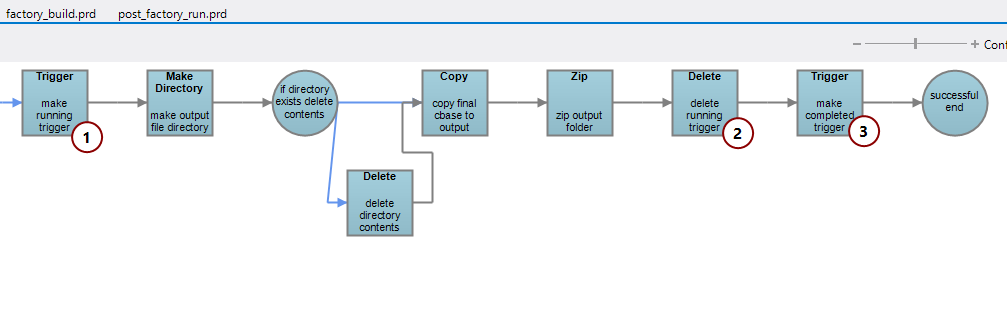
In the sample project, every Trigger node has an accompanying Delete node:
-
This Trigger node creates a running trigger.
-
This Delete node deletes the running trigger.
-
This Trigger node creates a completed trigger that is deleted before this script is run again.
Additionally, each Production script with trigger files is called by a run Production script. These run scripts feature a failure condition that leads to a Delete node that removes all trigger files should an error occur when the Production script runs.
Using Triggers in Conditional Nodes
There are three ways to use trigger files in conditional nodes. In the following example, each row represents one condition:

-
Trigger File Exists—You provide a directory and file name in the conditional. The condition returns true if a trigger file that matches the file name and directory exists.
-
Trigger File Missing—You provide a directory and file name in the conditional. The condition returns true if no trigger file exists that matches the file name and directory.
-
Trigger File Contents—You provide a directory and file name as well as a string to search for in the contents of the file. This string is case-sensitive. The condition returns true if a trigger file that matches the file name and directory exists with contents that match the search string.
Putting Data in Trigger Files
You can include data in trigger files when the Trigger node creates them by using the Trigger File Contents pane on the Trigger node editor. This can be useful when you want a trigger file to be created regardless of whether a process succeeded or failed. In that case, the trigger file can contain a string that says if the process ran successfully or not, and later processes can use those contents to determine how to proceed. In the sample project, the "Completed" trigger file for the factory_build Production script is populated with either Success or Failure. Later conditionals use those strings to determine if a Production script should execute or not.
This example is partly based on a Dimensional Insight Knowledge Forum video, available at: Using Triggers in Production.