The following example show
stamp-area id = "stamp-area" device-type = "all" {
      title "Stamp Area Code Sample 1"icon "/divetab/images/menu icons/2.png"factory-name "distributor-mf_02"date-display-name "My Date"stamp "Today vs Yesterday" label = "Today Stamp" {
        text {
          current-day {
            label "Today"
          }
          previous {
            differencepercent-differencelabel "Yesterday"
          }
        }
      }
      stamp "MTD vs LY Complete Month" label = "VS LY Complete Month" {
        text {
          month-to-date {
            label "Current" {
              column-title "Current Month"
            }
          }
          previous-year type = "complete" {
            differencepercent-differencelabel "LY MTD" {
              column-title "LY Complete Month"
            }
          }
          label "MTD vs LY Complete Month"
        }
      }
      stamp "QTD vs LY QTD" label = "MTD" {
        text {
          month-to-dateprevious-year {
            differencepercent-difference
          }
        }
      }
      stamp "YTD vs Prev YTD" label = "YTD" {
        text {
          year-to-date
          previous-year {
            difference
            percent-difference
          }
        }
      }

      stamp "Today vs Same Day LY" label = "Today vs One Year Ago" {
        text {
          current-day
          previous-year {
            difference
            percent-difference
          }
        }
      }
      stamp "MTD vs Prev MTD" {
        text {
          month-to-date
          previous {
            difference
            percent-difference
          }
        }
        analysis-column "Today vs Same Day LY"
      }
      stamp "YTD vs LY Complete Month" label = "LY Complete Month Stamp" {
        text {
          year-to-date
          previous type = "month-end" {
            difference
            percent-difference
          }
        }
      }

      stamp "R3-to-Date vs LY R3-to-Date" label = "VS LY R3 Stamp" {
        text {
          rolling-months 3
          previous-year {
            difference
            percent-difference
          }
        }
      }
      stamp "R6-to-Date vs Prev R6-to-Date" label = "R6 vs Prior R6" {
        text {
          rolling-months 6
          previous-year {
            difference
            percent-difference
          }
        }
      }
      stamp "R12-to-Date vs LY Complete R12" label = "R12 vs LY Complete R12" {
        text {
          rolling-months 12
          previous-year type = "complete" {
            difference
            percent-difference
          }
        }
        analysis-column "R3-to-Date vs LY R3-to-Date"analysis-column "R6-to-Date vs Prev R6-to-Date"
      }

      stamp "Line Chart YTD vs LY" {
        line-chart {
          year-to-date
          previous-year {
            difference
            percent-difference
          }
        }
      }
      stamp "Bar Chart R12 vs LY" {
        bar-chart {
          rolling-months 12
        }
      }

      stamp "VS Total" {
        text {
          current-day
          versus aux-measure = "Total" {
            percent-difference
          }
        }
      }
      stamp "VS Goal" {
        text {
          month-to-date
          versus aux-measure = "Goal"
        }
      }
      stamp "VS Sample Budget" {
        text {
          quarter-to-date {
            label "Actual"
          }
          versus aux-measure = "Sample Budget" {
            difference
            percent-difference
          }
        }
      }

      stamp-book "nTD" {
        stamp "QTD vs LY QTD"stamp "YTD vs Prev YTD"stamp "MTD vs Prev MTD"stamp "MTD vs LY Complete Month"stamp "YTD vs LY Complete Month"
      }

      stamp-book "Rn" {
        stamp "R3-to-Date vs LY R3-to-Date"stamp "R6-to-Date vs Prev R6-to-Date"stamp "R12-to-Date vs LY Complete R12"
      }

      stamp-book "Chart" {
        stamp "Line Chart YTD vs LY"stamp "Bar Chart R12 vs LY"
      }

      stamp-book "Aux-Measure" {
        stamp "VS Total"stamp "VS Goal"stamp "VS Sample Budget"
      }

      stamp-book "All" {
        stamp-book "nTD"stamp-book "Rn"stamp-book "Chart"stamp-book "Aux-Measure"stamp "Today vs Yesterday"stamp "Today vs Same Day LY"
      }

      default-stamp-book "All"default-stamps {
        default-stamp measure = "9L Cases" stamp = "R12-to-Date vs LY Complete R12"default-stamp measure = "Cases" stamp = "MTD vs LY Complete Month"default-stamp measure = "Sample Expenses" stamp = "VS Sample Budget" default-stamp measure = "Cases" stamp = "QTD vs LY QTD"default-stamp measure = "Velocity" stamp = "Line Chart YTD vs LY"
      }

      measure "9L Cases" stamp-book = "Rn"measure "Cases" stamp-book = "nTD"measure "Net Sales"measure "Accts Sold"measure "Sample Expenses"measure "Velocity"measure "Net Sales"measure "Goal"filters {
        filter "Supplier"filter "Premise"
      }

      dimensions {
        dimension "Sales Representative"dimension "Product Type"dimension "Brand"dimension "Date"dimension "Sales Division"dimension "Vintage"
      }
      update-time aux-measure = "Update Time" format = "MMM D, YYYY"
    }
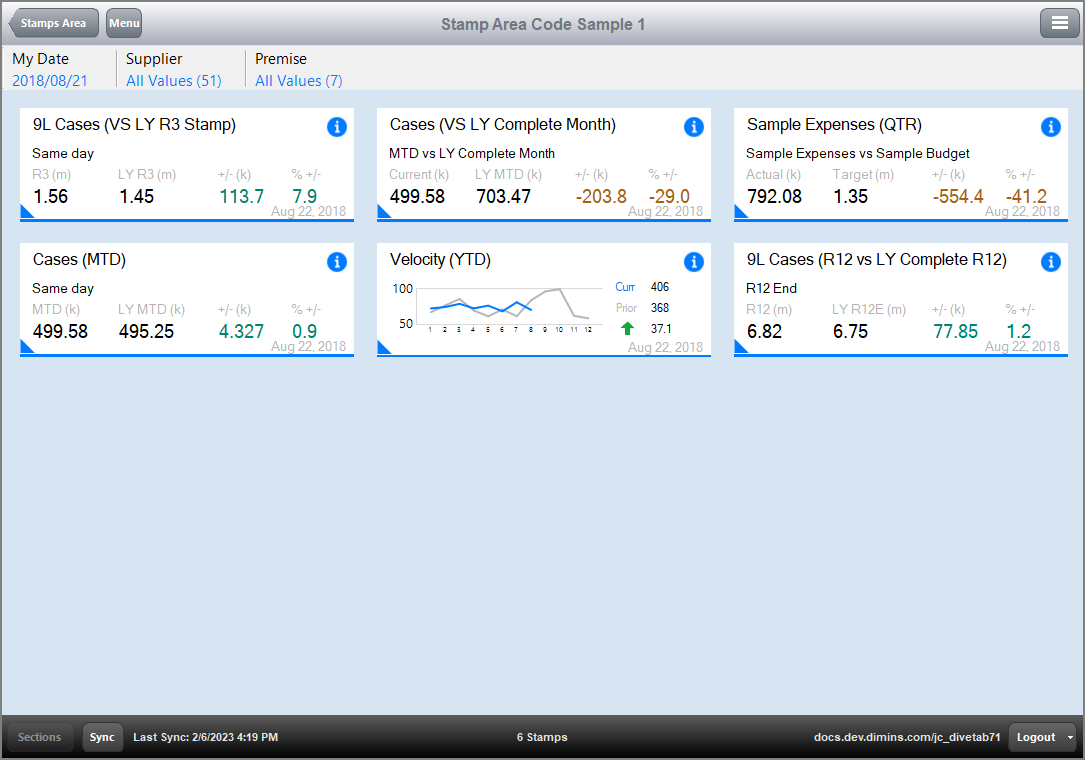
The  result of the code in DiveTab for the stamp area.
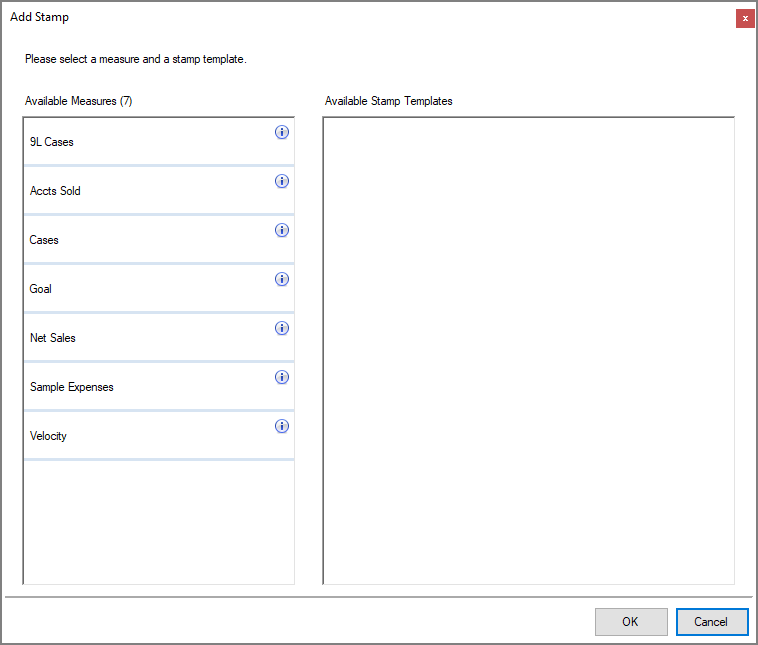
Add Stamp dialog box.
See also: