Many of the file tab types have various properties panes where you can make adjustments to the file or script. As an example, this topic discusses the cBase output object properties panes found in a Visual Integrator tab.
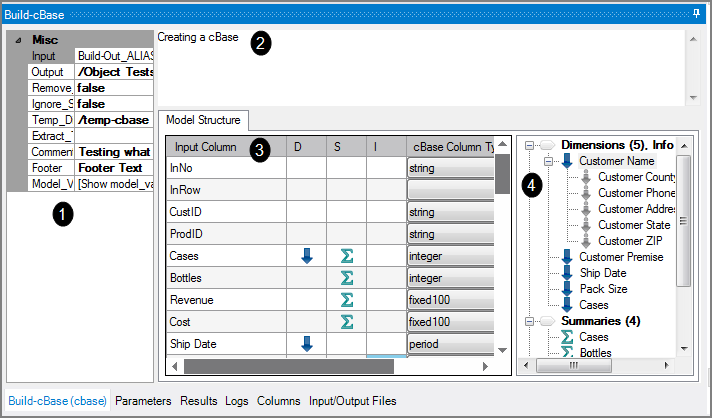
The table details the properties panes for a Builder object (the numbers below reference the numbers in the graphic).
| Pane | Purpose | |
|---|---|---|
| 1 | Object attributes | Set cBase output object attributes. |
| 2 | Comments | Add any comments, which may guide you (or a co-worker) with debugging or future changes. |
| 3 | Model Structure | Set properties for input column’s elements in the Model Structure tab (double-click a column to review or edit the properties). |
| 4 | Tree Structure |
A listing of all the dimensions and summaries that exist in the cBase (double-click a dimension to review or edit the properties). |
See also: Visual Integrator Overview.