Below are examples of how a Pages block can be used in DiveTab. Data pages that are explicitly linked to, or central pages with their automatic linking, are included in a Pages Block.
IMPORTANT: You can link to a data-area in the pages block from another data-area. Links to a central page are created automatically.
 Example of an Overview Page Linked to a Report Page
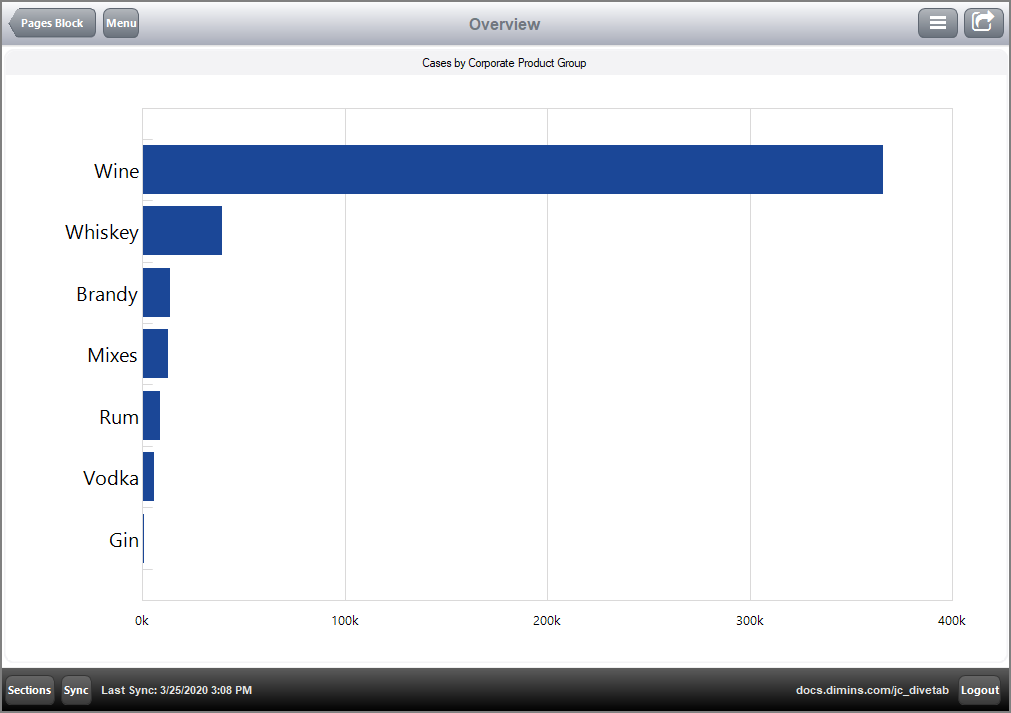
The following code is used in defining an overview page. The column for the hbar-chart includes a link to a report page.
divetab version = "0.0" {

  data-area id = "data-area-1" {
    title "Pages"
    icon "/divetab/images/Document288.png"

    sections {
      overview-page {
        title "Overview"
        cplan "/cplans/basic_101.cplan"

        tab {
          screen {
            layout {
              vsplit {
                hsplit {
                  box {
                    title "Cases by Corporate Product Group"

                    hbar-chart {
                      dimension "Corporate Product Group"
                      bar column = "Cases" {
                        link {
                          page id = "rp-customer"
                        }
                      }
                      sort-column "Cases"
                      hide-legend
                    }
                  }
                }
              }
            }
          }
        }
      }
    }

    pages {
      report-page id = "rp-customer" {
        title "Customer"
        cplan "/cplans/basic_timeseries.cplan"

        dimension "Corporate Supplier"
        dimension "Customer"
        parameter "Corporate Product Group"

        text column = "Cost"
        text column = "Cases"
      }
    }
  }
}
Here is the result of the code in DiveTab.
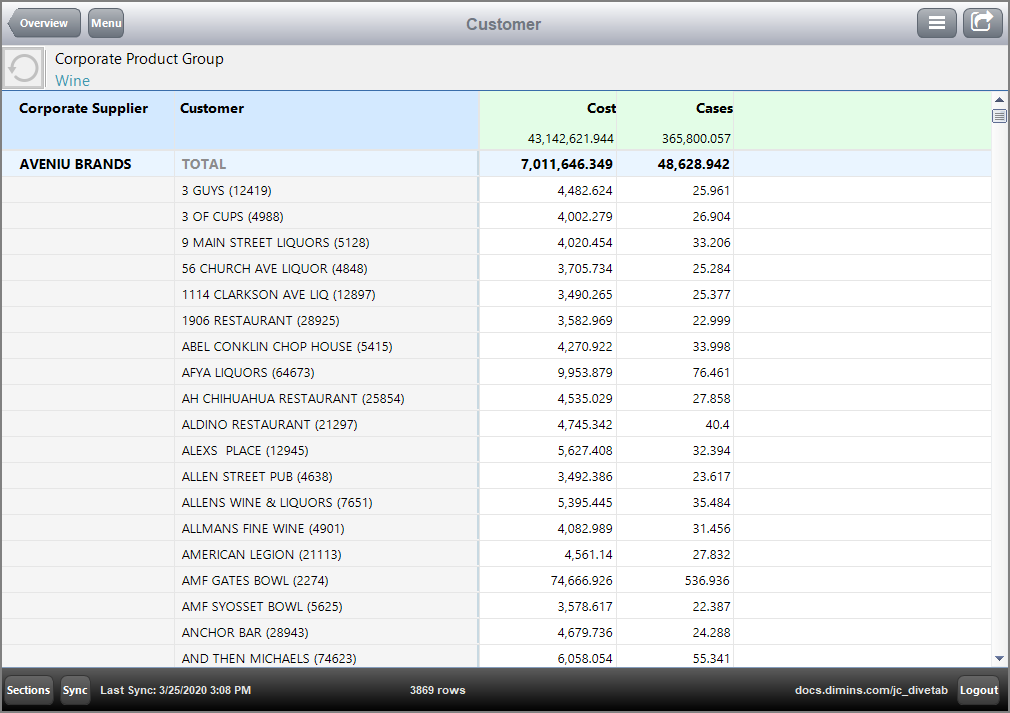
Here is the resulting page when the link for the bar-chart value, Wine, is followed.
 Example of an Overview Page Using Central Pages
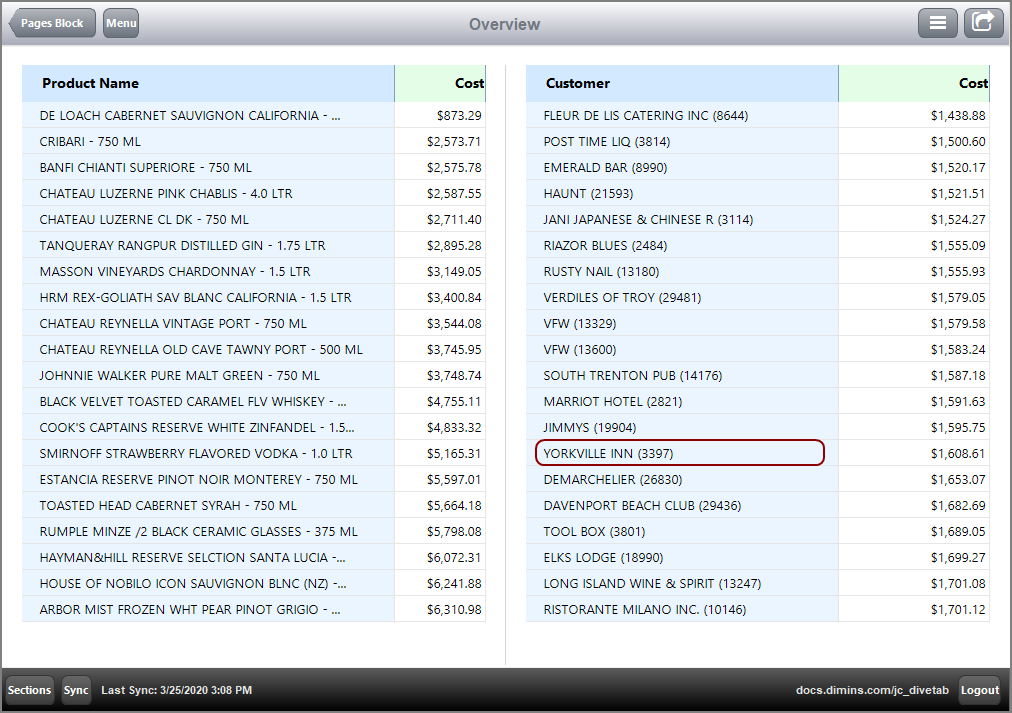
Here is a customized example of an overview page using central pages.
divetab version = "0.0" {

  definitions {
    elements {

      grid id = "gddimensions" {
        row
        row "Product Name"
        row "Customer Count"
      }

      grid id = "gddimcount" {
        row
        row {
          text column = "Product Name Count"{
            justification "left"
            link {
              page id = "rp-product"
            }
          }
        }
        row {
          text column = "Customer Count" {
            justification "left"
            link {
              page id = "rp-customer"
            }
          }
        }
      }

      bar-chart id = "br-yearmo" {
        title "YearMo"
        dimension "Posting Period"
        bar column = "Cases"
      }

      table id = "tb-product" {
        dimension "Product Name"
        text column = "Cost" {
          value-format "$#,###.00"
        }
        sort-column "Cost" reverse = true
        first 20
      }

      table id = "tb-customer" {
        dimension "Customer"
        text column = "Cost" {
          value-format "$#,###.00"
        }
        sort-column "Cost" reverse = true
        first 20
      }
    }
  }

  data-area id = "data-area-1" {
    title "Pages Sample"
    icon "/divetab/images/trends.png"

    sections {

      overview-page {
        title "Overview"
        cplan "/cplans/basic_timeseries.cplan"

        tab {
          screen {
            layout {
              vsplit {

                hsplit percent = 3
                hsplit percent = 97 {
                  spacer percent = 2
                  element id = "tb-product" percent = 46
                  line percent = 4
                  element id = "tb-customer" percent = 46
                  spacer percent = 2
                }
              }
            }
          }
        }
      }
    }

    pages {
      report-page id = "rp-customer" {
        title "Customer"
        cplan "/cplans/basic_timeseries.cplan"
        dimension "Customer"

        parameter "Customer"
        parameter "Product Name"

        text column = "Cases"
        text column = "Cost"
      }

      report-page id = "rp-product" {
        title "Product"
        cplan "/cplans/basic_timeseries.cplan"
        dimension "Product Name"

        parameter "Customer"
        parameter "Product Name"
        parameter "Corporate Chain"
        parameter "Corporate Brand"

        text column = "Cases"
        text column = "Cost"
      }

      central-page {
        dimension "Customer"
        dimension "Product Name"

        parameter "Customer"
        parameter "Product Name"

        cplan "/cplans/basic_timeseries.cplan"

        tab {
          screen {
            layout {
              vsplit {

                hsplit percent = 25 {
                  spacer percent = 10
                  line percent = 1
                  element id = "gddimensions" percent = 20
                  line percent = 1
                  element id = "gddimcount" percent = 30
                }

                line percent = 5
                hsplit percent = 70 {
                  spacer percent = 10
                  element id = "br-yearmo" percent = 80
                  spacer percent = 10
                }
              }
            }
          }
        }
      }
    }
  }
}
Here is the result of the code in DiveTab.
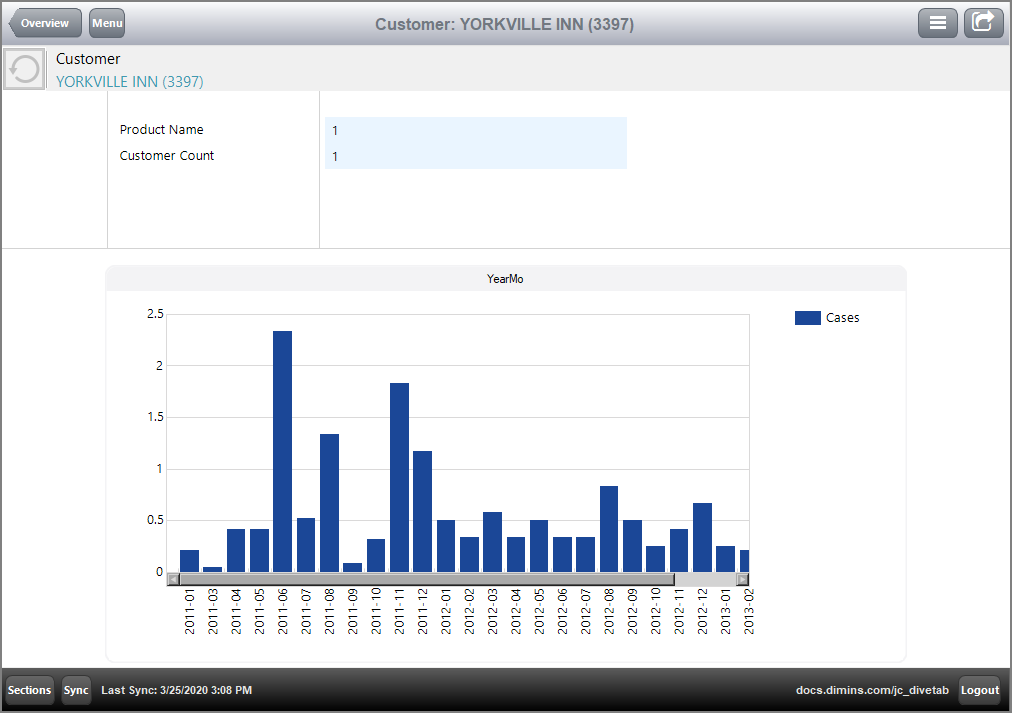
Here is the resulting central page linked from dimension Customer value YORKVILLE INN.
See also: