To make an Info Field diveable in the Diver client, you must promote the Info Field to a dynamic dimension. The following procedure describes how to promote an Info Field using DiveMaster.
-
In Workbench, connect to a server, and open a project.
-
Choose a DivePlan, and select Open with > DiveMaster.
-
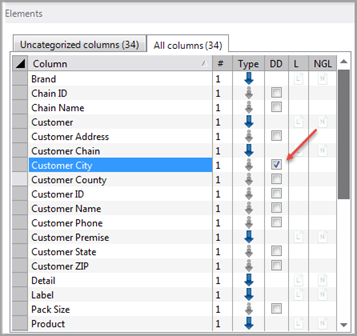
In the Elements section, click the
 DD (dynamic dimension) box that is associated with an Info Field. In the example graphic, the DD box for the Info Field named Customer City is selected to promote that column to a Dynamic Dimension.
 -
To return a dynamic dimension to an Info Field, clear the check mark from the DD box associated with the field.
NOTE: You can also promote an Info Field to a dynamic dimension by dropping the field into a console category. Additionally, you can promote all Info Fields to dynamic dimensions by right clicking the DD column of any Info Field and selecting Set all info fields as dynamic from the context menu.
See also About Promoting Info Fields to Dynamic Dimensions.