A dynamic dimension is an information field that has been promoted to a dimension in order to make it diveable.
On the Console, dynamic dimensions appear with a gray down-arrow and a blue circle icon  .
.
Although dynamic dimensions allow you to surpass the maximum number of dimensions that a model supports, you must consider that using them can slow ProDiver performance in a model environment.
To promote an information field to a dynamic dimension:
-
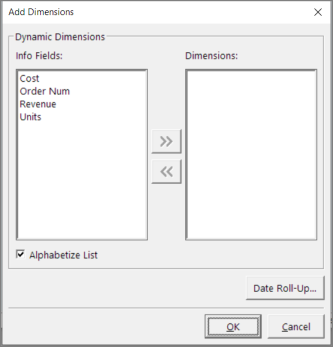
On the ProDiver menu bar, select Data > Add Dimension.
The Dynamic Dimensions
 dialog box opens.
 - Select the Info Fields that you want to promote, and then click >>.
- Click OK.
The dynamic dimensions appear on the Console, and the info fields are retained in the model or cBase.