Using the Report Palette Context-Sensitive Menu
A context-sensitive menu is available on ProDiver report palettes. You can use it to perform functions on the report palette.
To access the  context-sensitive menu, right-click anywhere on a report palette.
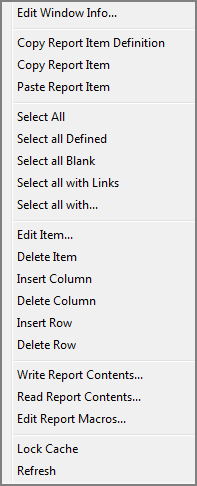
These options are available:
| Edit Window Info
|
Opens the Edit Window Information dialog box, in which you can change the name shown as the report palette title.
|
| Copy Report Item Definition
|
Copies the definition of the selected report items to the clipboard. |
| Copy Report Item
|
Copies the contents of the selected report items to the clipboard. |
| Paste Report Item
|
Pastes the contents of the clipboard. |
| Select All
|
Selects all cells. |
| Select all Defined
|
Selects all cells that have a string entered in the item definition box. Cells that have text entered on the Text tab only are not selected. |
| Select all Blank
|
Selects all cells that have an empty item definition box. |
| Select all with Links
|
Selects all cells that have links defined in the Link tab. |
| Select all with
|
Selects all cells that include text that you specify. The specified text is case sensitive. Asterisk * and question-mark ? characters are not accepted as variables. Items entered as preceding text, trailing text, or attributes are not selected. |
| Edit Item
|
Opens the Edit Item dialog box, which you can use to edit the selected breaklevel or cell or add a new item to the report palette. |
| Delete Item
|
Removes the selected breaklevel or cell from the report palette. |
| Insert Column
|
Inserts a column to the right of the selected column reference label. If no column reference label is selected, a column is inserted at the right-most side of the report. |
| Delete Column
|
Removes the column to the right of the selected column reference label. |
| Insert Row
|
Inserts a row above the selected cell. |
| Delete Row
|
Deletes the rows that have selected cells. |
| Write Report Contents
|
Opens the Save Blank Report window, which you can use to save a report palette as a txt file. |
| Read Report Contents
|
Opens the Read Blank Report window, which you can use to browse to and read a report palette that was saved as a txt file. |
| Edit Report Macros
|
Opens the Edit Report Macros dialog box, which you can use to create or edit complex item definitions. |
| Lock/Unlock Cache
|
Toggles the Lock Cache feature. When the cache is locked, if you change a cell definition, only that cell is updated. This saves time when editing large palettes with interconnected cell references. |
| Refresh
|
Refreshes the report palette. |
NOTE: When rows and columns are inserted or deleted, references to the impacted cells are adjusted automatically.
See also: