The active dive window appears in the foreground of the display. Typically, it shows the most recent dive. However, you can go back to an earlier dive, and reactivate that dive window.
This example shows a four-level dive:
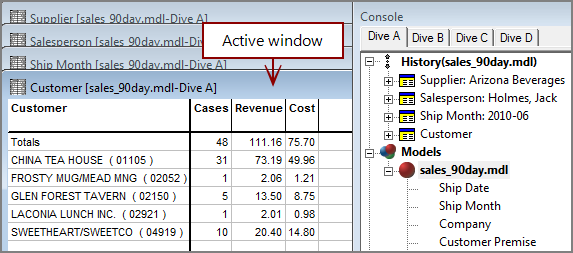
You can see by the window title bars and the dive history that
If you want to compare these statistics with those of another salesperson, you can reactivate the dive on Salesperson and select another name. ProDiver recalculates the data in the four-step dive, and displays the updated results. This is called a cascade dive.
For example, to reactivate the Salesperson dive window, either click the Salesperson dive window title bar or double-click the Salesperson line in the Console History.

On the Salesperson dive window, select a different salesperson by double-clicking their name.

ProDiver automatically repeats the four-step dive path: Supplier (
The active dive window shows the new results, and the Console updates the dive History.

See also Cascade Printing