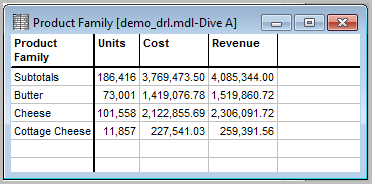
Complete the following steps to create a baseline tabular report.
- Open Workbench and connect to a server.
- Open a project and navigate to the directory that contains the sample model file called demo_drl.mdl.
- Right-click the model name, and select Open with > ProDiver.
- On the Console, double-click the Salesperson dimension to open the dive window.
- Select Assil.
- On the Console, double-click Product Family.
- On the dive window, Ctrl+Click the Butter, Cheese, and Cottage Cheese values.
- Click the Focus icon to display the following dive window:
- NOTE: The above tabular is referenced in other Help topics that build upon this baseline report.