Adding a Dive Window Link Using a Window Reference String
Complete the following steps:
-
Select a server with a project that contains a sales model with dimensions and summaries, such as:
- Supplier, Brand, and Ship Month
- Cases, Revenue, and Cost
For illustration purposes, this procedure refers to a sales model called sales_90day
- In ProDiver, locate and open sales_90day.mdl.
- On the Console, double-click Salesperson.
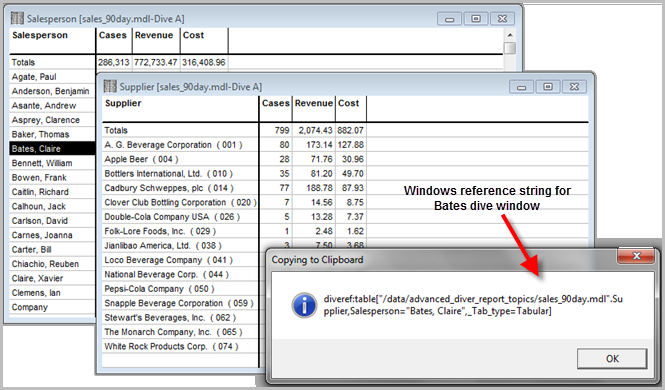
- Select Bates, Claire in the dive window.
-
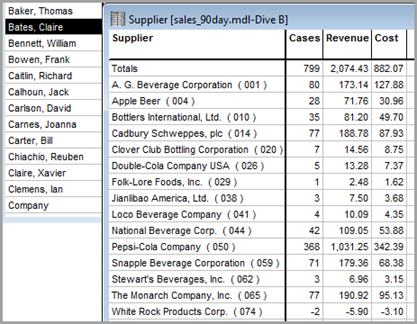
On the Console, double-click Supplier to create a dive window showing Bates' sales for each Supplier. Right-click anywhere on the dive window, and select Copy Window Dive Reference String to
 copy the reference string to the Clipboard.
 - Open a second instance of ProDiver, and repeat steps 2–4 for salesperson Agate, Paul.
- On the Console, double-click Supplier to create a dive window showing Agate's sales for each Supplier. Complete the following actions:
- Click the Report icon to open the Default Report dialog box.
- In the Title box, enter Paul Agate Sales for Supplier.
- Click OK.
- Unlock the report, and double-click the Cases column to open the Edit Item dialog box. Complete the following actions:
- Click the Link tab.
- Select the Use Link option.
- For the Link Activation Type, select Double-click.
- Paste the dive reference string from step 5 into the Window Reference field.
- Click OK.
- Lock the Agate report.
- Double-click the Cases column to open the linked dive window for Bates, Claire.