Before adding a new measure to a factory, you must consider existing data and determine if prerequisites are met. Use the following flowchart to help you determine whether the underlying data, rules, and supporting measures exist for you to develop and deploy a new measure.
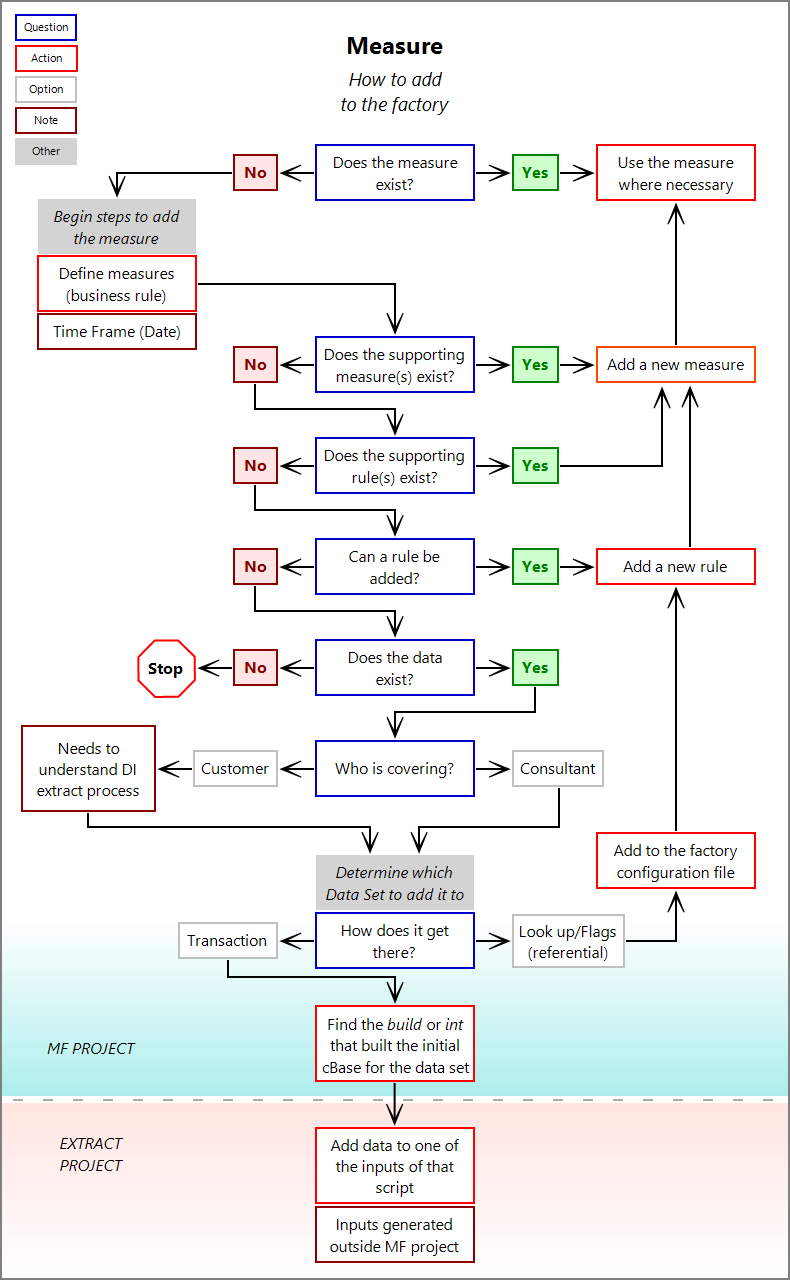
To determine whether a new measure needs to be added:
-
Determine if the measure already exists.
- If yes, use the measure where necessary.
- If no, continue to the next step.
-
Determine if supporting measures exist.
- If yes, add the new measure to the factory configuration using supporting measures.
- If no, continue to the next step.
-
Determine if supporting rules exist.
- If yes, add the new measure to the factory configuration using rules.
- If no, continue to the next step.
-
Determine if a rule can be created.
- If yes, create the rule and the measure.
- If no, continue to the next step.
-
Determine if the data exists.
- If yes, continue to the next step.
- If not, stop: you cannot create a new rule or measure without data.
-
Determine who is in charge of the data. Either you or a DI consultant.
NOTE: Knowledge of the DI extract process is required.
-
Determine which Data Set the data belongs to and what type of data it is:
- If it is referential data, you can use a flag or lookup table in the data set to create a rule. For more information, see Measure Factory Flag Tables or Measure Factory Lookup Tables.
- If it is transactional data, you must add it to the cBase for the data set possibly using the initial build script or int file. For more information, see Creating cBases with Spectre Build Scripts or Creating cBases with Visual Integrator Scripts.
See also: