Measure Factory Best Practices

Consider these best practices as you develop a factory configuration file.

Best Practices for Rules

  • Try to achieve the right balance between rules and measures.

  • When a rule refers to an individual row of data, give it a singular name. ClosedExample

  • Write calc rules that produce a Boolean value (true or false) wherever possible. (You can use this type of calc rule to filter measures.) ClosedExample

  • Use a calc rule to concatenate the text for a code and its description. ClosedExample

    The + operator concatenates the MS DRG code and its description. Additionally, the if() function checks whether the description is blank; if not, it returns text in the format <code>-<description>. If the description is blank, the function returns only the code.

    calc-rule "MS DRG" `value("MS DRG Code") + if(is_null(value("MS DRG Description")), "", "-" + value("MS DRG Description"))` { }

  • Avoid overly-complex calc rules that use many or operators.
  • Use flag rules to bring groups of codes into the configuration file for inspection. ClosedExample

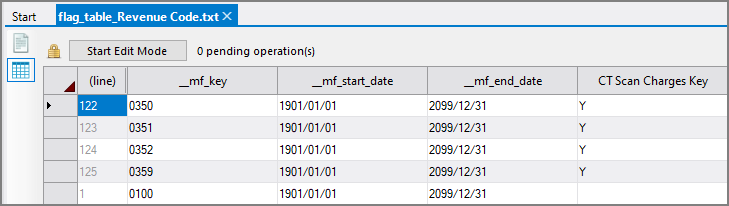
    The flag table in this example brings in Revenue Code values. It inspects the CT Scan Charges Key column, and for rows with a value of Y, returns the corresponding revenue code from the __mf_key column.

    The Revenue Code flag table with with values in the CT Scan Charges Key column

  • Name a flag table and its key rule after the column in the source data with which the flag rule is associated. ClosedExample

    If the source data has a column named Diagnosis Code, name the flag table file flag_table_Diagnosis Code.txt, and write the following lines in the configuration file:

  • Give plugin scripts a descriptive name, and name the objects within them. ClosedExample

    An Integrator script with an object named diag-cbase-CBS

  • For plugin scripts, specify the data types of the columns in the output cBase. ClosedExample

    The columns in the output cBase are specified as strings

Best Practices for Measures

  • Reuse measures as often as you can. ClosedExample

    measure "Acute Discharge Days" [...] {

    }

    measure "Acute Discharges" [...] {

    }

    measure "Acute ALOS" `measure("Acute Discharge Days") / measure("Acute Discharges")` [...] {

    }

  • Make measure names plural. ClosedExample

    measure "Acute Admissions" [...] {
    }
  • Use consistent names for similar measures. ClosedExample

    measure "Accurate Case Duration Estimates" [...] {

    }

    measure "Accurate Case Duration Estimates %" [...] {

    }

  • Write intuitive calc and filter expressions. ClosedExample

    This filter brings in only HF (heart failure) accounts, and then the dimcount() function counts the number of MRNs (medical record numbers).

  • Use the filter to bring in just enough data to calculate the measure. ClosedExample

    This filter brings in only accounts that have an AMI (heart attack) discharge and then applies the calculation.

    measure "AMI ALOS" `measure("AMI Discharge Days") / measure("AMI Discharges")`

    filter=`value("AMI Discharge")` { }

  • For measures that calculate a count, use the filter to bring in only the values to be counted, and then use the count() function. ClosedExample

    This filter brings in only accounts that have an admission, and then the calculation counts the number of them.

    measure "IP Admissions" `count()` filter=`value("Admission")` {

    }

  • For measures that calculate an average, use the filter to determine the denominator and then use a function—such as average()—to perform the calculation. ClosedExample

    This filter brings in only inpatient accounts that have been discharged. This value defines the number of items to be averaged (the denominator).

    The calculation then takes the average of a value that is related to those items. In this case, it takes the average of the charges that were billed to the accounts.

    measure "Avg IP Charges Per Discharge" `average(value("Total Charges IP Discharges"))` filter=`value("Total IP Discharge")` { }

  • For measures that calculate a ratio of two other measures, use the same filter as the denominator of the ratio. ClosedExample

    measure "Overall ALOS" `measure("Total Discharge Days") / measure("Total Discharges")` filter=`value("Discharge") or value("Normal Newborn Discharge")` { }

    measure "Total Discharges" [...] filter=`value("Discharge") or value("Normal Newborn Discharge")` { }

  • Specify a measure's initial dimension only if it is something other than the first value in the associated dimension set. ClosedExample

    measures {

    }

Best Practices for Scopes

  • Avoid removing values directly from a data set. Instead, use a summary scope to filter out the values. ClosedExample

    This scope brings in only values that have a date of today or earlier. It filters out values without dates and values whose dates are in the future.

Best Practices for Dimensions

  • Alphabetize the dimension names in a dimension set. This makes the list of dimensions easier to read in the DivePort Analysis portlet. ClosedExample

  • Create date-time dimensions within Measure Factory. ClosedExample

    You can use the date-rollup tag to create new date-time dimensions. The new dimension is based off of a date value from the source system.

    dimensions {
        category "Dates-Times" {
          dimension "Admit Date"
          dimension "Admit Month" {
            date-rollup period="monthname" rule="Admit Date"
          }
        }
      }
    NOTE:When creating a date rollup as part of a factory, ensure that the columns created by the date rollup are not previously defined.

See also: