Source rules are derived from columns in the cBase and are automatically included in the data set. Identifying a source rule allows you to add metadata.
TIP: Before identifying the source rule, you need to know the column name. You can open the cBase with ProDiver to see the columns that are used as source rules.
To add metadata to a source rule from the Data Sets page:
-
In the left pane of the Data Sets page, double-click the data set that you want to edit.
The
 data set opens in the center pane.
 -
In the center pane next to Source, click the double chevron
 to expand the source section.
 -
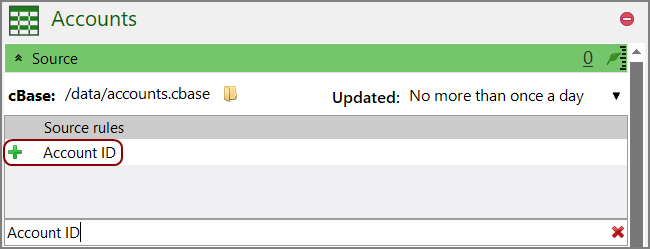
Enter a column name in the filter source rules or add new text box.
The
name of the rule appears in the table. -
Click
 next to the rule name.
The rule is added to the table.
-
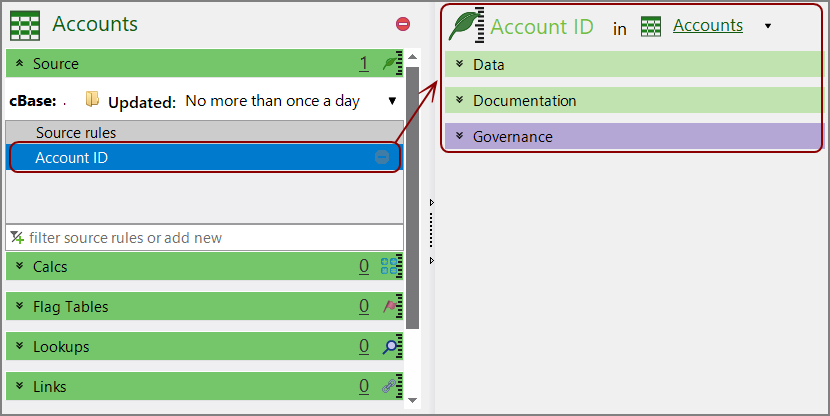
Double-click the source rule.
The rule opens in the
detail pane on the right. -
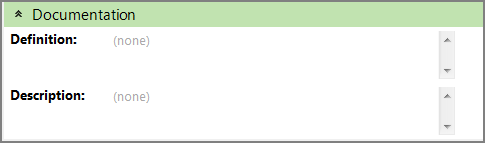
Expand the
Documentation double chevron to enter additional information about the rule if your organization requires it. -
Click the blank section to the right of a field to edit it. When editing in the multi-line text boxes, press Ctrl+Enter or Shift+Enter to create a new line, or press Enter to apply your changes and exit edit mode.
Click
 to confirm your changes.
 - Optionally, expand the Governance section to enter notes regarding governance. For example, who is responsible for updates, or when it was last modified.When editing in the multi-line text boxes, press Ctrl+Enter or Shift+Enter to create a new line, or press Enter to apply your changes and exit edit mode.
- Save the tab.


See also: