Setting the Executable Path Variables
After you have installed the Diver Platform Server components, you must add their directory paths to the System Variables > PATH on your machine.
For example:
- C:\DI\Solution\executables
- C:\DI\Solution\diveline\bin
NOTE: This example is specific to Windows 10. If you are running a different version of Windows, the individual steps might differ.
To set the directory path variables for the executables, complete the following steps:
-
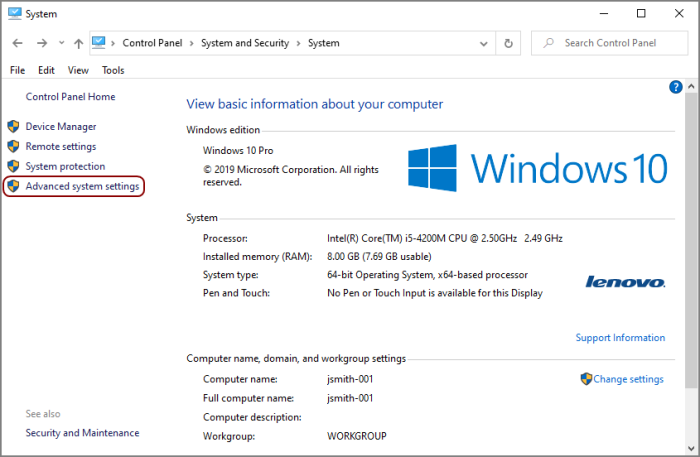
Navigate to Control Panel\System and Security\System.
NOTE: There are multiple ways to navigate the Windows operating system. This method uses a path in the Windows Explorer.
The
 System window opens.
 -
Click the Advanced system settings button.
The
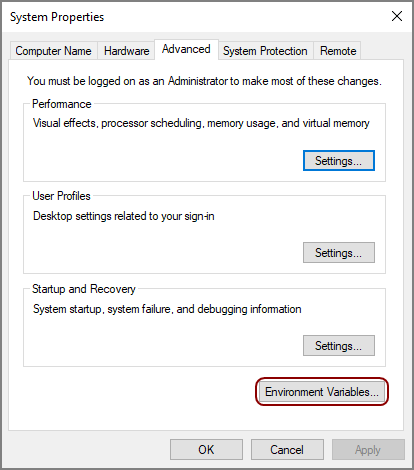
System Properties dialog box opens. -
On the Advanced tab, click Environment Variables.
The
Environment Variables dialog box opens. -
From the
System Variables list, select Path and then click Edit.The
Edit environment variable dialog box opens. - Click New.
- Enter the new value.
-
Repeat steps 5 and 6 for each value. These values are required:
C:\DI\Solution\executables
C:\DI\Solution\diveline\bin
NOTE: Depending on the Windows version, the values are in a list or string. If the values are in the string format, you must insert semi-colons as a separator.
-
Click OK to save changes.
The Edit System Variable dialog box closes.
- Click OK to exit the remaining dialog boxes.