Enabling the Default HTTPS Connector
To establish a connection between DivePort and NetDiver clients and Tomcat, you must enable the HTTPS connector by editing the server.xml file.
-
If Tomcat is running, stop it.
sudo /di/platform/downloads/apache-tomcat-<version-number>/bin ./shutdown.sh
-
Go to the Tomcat directory (/etc/tomcat<version-number>)
cd /etc/tomcat<version-number>
-
Make a backup copy of the server.xml file called serverorig.xml
sudo cp server.xml serverorig.xml

-
Verify that the file is copied correctly by entering the following command:
ls
-
View the permissions of the server.xml file
ls -l server.xml
The permissions display. If the permissions are -rwxrwxrwx, you can edit the file.
If you do not have permissions:
-
Enable the execute permission.
sudo chmod a+rwx server.xml
-
Verify that the permissions have changed.
ls -l server.xml
-
-
Open the server.xml file using a text editor, such as gedit.
gedit server.xml
-
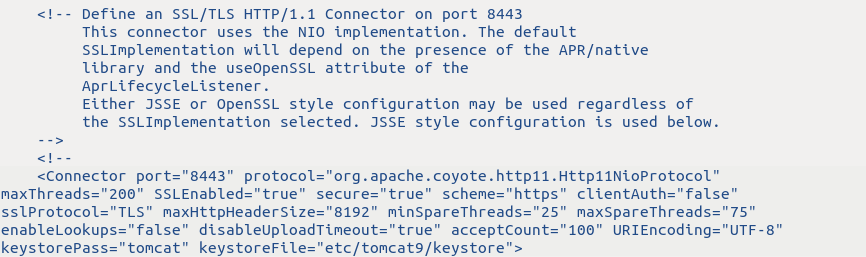
Locate the section beginning with Define an SSL/TLS HTTP/1.1 Connector on port 8443.
-
In the "Define an SSL/TLS HTTP/1.1 Connector on port 8443" and "Connector port" sections of the server.xml file, make the following edits:
- Remove the commented lines beginning with "This connector..." and ending with "used below".
-
After <Connector port= "8443", add the following attributes:
CopySSLEnabled="true"
maxHttpHeaderSize="8192"
minSpareThreads="25"
maxSpareThreads="75"
enableLookups="false"
disableUploadTimeout="true"
acceptCount="100"
URIEncoding="UTF-8"
keystorePass="tomcat"
keystoreFile="/etc/tomcat9/keystore"
-
Remove the comment symbols, (<!-- and -->) around the <Connector Port= ... /> section. The file appears as follows:

-
Save and close the server.xml file.
-
Start Tomcat.
sudo /di/platform/downloads/apache-tomcat-<version-number>/bin ./startup.sh
NOTES:
-
When DivePort software generates URLs, non-ASCII characters are encoded to ensure that the URL only contains ASCII characters. For these generated strings, ISO-8859-1 or UTF-8 encoding is acceptable.
-
If users intend to enter URLs that contain non-ASCII characters, set the
URIEncodingon the Tomcat connector according to the encoding that they intend to use.