Configuring Own Authentication
Setting Own authentication type allows you to maintain DiveLine user information entirely within Workbench. For more information, see Own Authentication.
To configure Own authentication:
- Open Workbench and open a DiveLine connection.
- Select Tools > Server Settings > General.
-
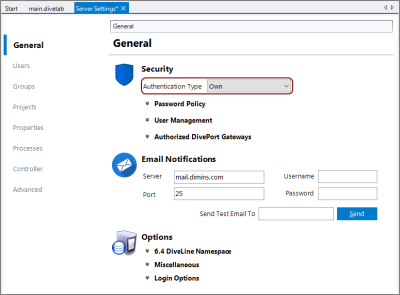
In the Security section, select Own from the Authentication Type pull-down menu.
-
Click the chevron next to Password Policy.
The Password Policy options display.
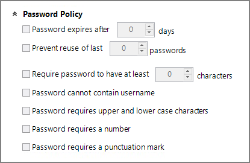
The Password Policy options allow you to specify and enforce criteria for creating and maintaining strong user passwords that comply with your company's security guidelines.
NOTE: Password Policy options are specific to Own authentication type.
-
Specify the password options:
- Password expires after “x” days—Sets the number of days after which passwords expire. This allows a user to change an expired password, regardless of whether or not password changing has been allowed on the user's profile. Individual users can be exempted from mandatory password expiration by selecting the Password never expires check box on their user profile Security/Licensing settings. Not selecting this option results in the password not expiring.
- Prevent re-use of last “x” passwords—Sets the number of previously used passwords that cannot be re-used. Not selecting this option, or entering "0", disables the feature, allowing users to reuse the same password repeatedly.
- Require passwords to have at least “x” characters—Sets the required number of characters for a user password. Not selecting this option, or entering"0", disables the minimum requirement setting.
- Password cannot contain username—Prevents using part or all of the username in the password.
- Password requires upper and lower case characters—Requires using both upper and lower case characters as part of the user password.
- Password requires a number—Requires using a number as part of the password.
- Password requires a punctuation mark—Requires using a punctuation mark, such as an exclamation point or comma, as part of the password.
NOTE: The DiveLine server-level password settings interact with settings on individual user accounts. For example:
- If you select Password expires after X days, users can change an expired password regardless of whether the User cannot change password option is selected for their user accounts.
- If you select Password never expires in their user account, you exempt an individual user from mandatory password expiration.
- Save the Server Settings, using File > Save or Ctrl+S.