Installing Help Desk
Help Desk allows for users without Developer licenses to edit groups and users.
NOTE: You need to be an administrative user to install the software.
To install Help Desk:
- Navigate to the DI\Solution\downloads directory where you downloaded the developer package.
-
Double-click the HelpDesk-Setup.exe file.
The User Account Control dialog box opens, asking you to confirm making changes to your device.
NOTE: Depending on your Windows version and user account settings, you might see the Open File - Security Warning dialog box instead. Confirm that you want to open and run the executable.
-
Click Yes.
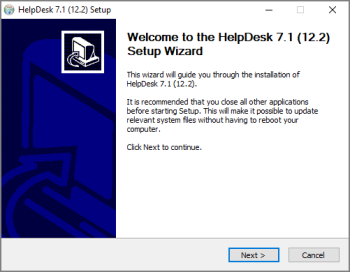
The HelpDesk <version number> Setup Wizard dialog box opens.
-
Click Next.
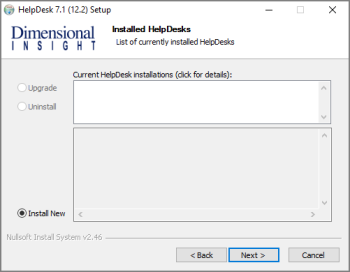
The Installed HelpDesks page opens.
-
Select one of the following:
- Upgrade
- Uninstall
- Install New
Each option guides you through the required steps. This example uses Install New.
-
Click Next.
The HelpDesk Install Path page opens.
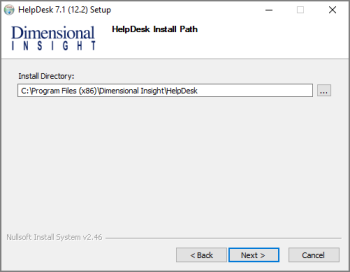
- Verify the directory for Help Desk installation.
-
Click Next.
The Ready to Install page opens.
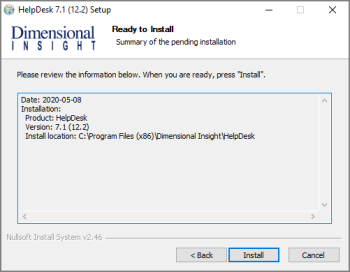
- Verify the Help Desk installation information.
-
Click Next.
The Installation page opens, and displays Installation Complete once finished.
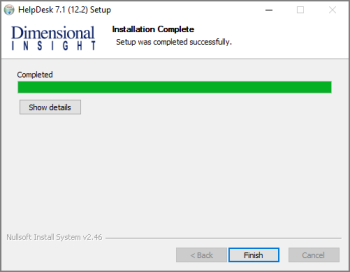
- Click Finish to close the installation wizard.