Configuring LDAP Authentication
Once you have collected your LDAP information, you need to configure LDAP authentication in Workbench.
To configure LDAP authentication:
- Open Workbench and open a connection.
-
Select Tools > Server Settings > General.

- Select LDAP from the Authentication Type pull-down menu.
-
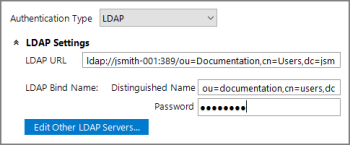
- Enter the LDAP URL. The LDAP URL defines the LDAP server, the username attribute, and the filter for searching the LDAP database. This URL is an LDAP URL as defined by RFC 2255, and takes the general form:
- ldap://<server>:<port>/<dn>?<attribute>?<scope>?<filter>
-
- server—The LDAP server hostname or IP address.
- port—The Transmission Control Protocol (TCP) port number to use to connect to the LDAP server. The default is 389.
- dn—The distinguished name used to start the search for the user.
- attribute—Used to match the given user name to DiveLine. If there are multiple attributes specified, only the first one is used. If no attributes are specified, the default attribute, uid, is used. DiveLine can also match an attribute and return a different attribute. Multiple attributes are separated by commas.
- scope—Defines the scope of the search, and should be either one to search the children of the given base, or sub to search all descendants of the given base. The sub option is recommended.
- filter—A string representation of the filter to apply in the search. It is appended to the username search using an AND condition, such as (&(user=attr)(filter)). This is optional.
- Enter the Distinguished Name. This field needs to contain the Distinguished Name of an LDAP administrator to use to log in to the server. This user must have permission to search the database. The Distinguished Name is passed in clear text.
- Enter the Password. This field must contain the password for the Distinguished Name given in the Distinguished Name field. The password is stored and passed in clear text.
- Save the Server Settings, using File > Save or Ctrl+S.
- Restart the DiveLine service for the LDAP settings to take effect.