Configuring DivePort for Web Server Authentication
DivePort needs to be configured so it knows the URL for DLCGI, allowing it to forward unauthenticated users to that address for authentication. This insures a single sign-on procedure for the end users.
If DiveLine is using Web Server authentication, you need to update two files:
- diveport.html
- <diveport>.xml
To update the diveport.html file:
- Copy the diveport.html template file located in \DI\Solution\webapps\<diveport>\dlcgi to the \DI\Solution\<diveline>\html directory.
- Rename the file, replacing diveport with the name of your installed instance of the DivePort application.
-
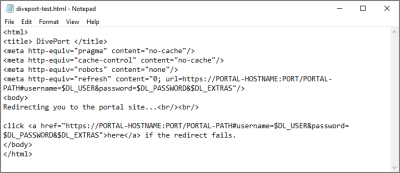
From the html directory, open the <diveport>.html in a text editor.
-
Replace the two instances of https://PORTAL-HOSTNAME:PORT/PORTAL-PATH with https://<servername>:8443/<diveport>.
Use your DivePort <servername> and <diveport> so the html file points to the correct URL.
To update the <diveport>.xml file:
- Select Control Panel > Administrative Tools.
- Open the Services window.
-
Stop the Tomcat service.

-
Locate the context file <diveport>.xml in the
C:\Program Files\Apache Software Foundation\Tomcat 9.0\conf\Catalina\localhost\diveport-test.xml
-
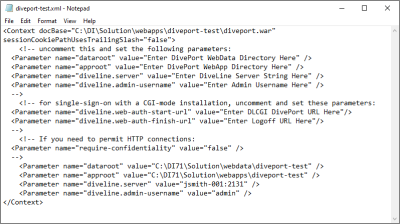
Open the file in a text editor.
-
Change the following parameters and values to match your DI\Solution directory and DiveLine Admin user setup:
-
Parameter name="dataroot"
For example:
Parameter name="dataroot" value="C:\DI\Solution\webdata\diveport-test"
-
Parameter name="approot"
For example:
Parameter name="approot" value="C:\DI\Solution\webapps\diveport-test"
-
Parameter name="diveline.server"
For example:
Parameter name="diveline.server" value="jsmith-001:2131"
-
Parameter name="diveline.admin-username"
For example:
Parameter name="diveline.admin-username" value="admin"
-
- Within the comment tags, delete the comment and enclosing tags, and set the following parameter and value lines:
Parameter name="diveline.web-auth-start-url"
This points to the DLCGI DivePort URL, which is the diveport.html file.
For example:
Parameter name="diveline.web-auth-start-url" value=“http://jsmith-001/cgi-bin/dlcgi.exe/diveport-test.html”
NOTE: If some users are not using single sign-on, redirect users using an authentication override of OWN to the logon dialog box by using one of the following formats instead:
- https://<servername>:8443/<diveport>/login
- https://<servername>:8443/<diveport>/#login=true
This avoids the CGI-authentication redirect.
Parameter name="diveline.web-auth-finish-url"
This points to the Logoff URL, that is, where DivePort users are directed after log off.
For example:
Parameter name="diveline.web-auth-finish-url" value=“http://www.dimins.com”
- Save your file changes and restart Tomcat.
If you require more information on using the DivePort DLCGI, contact Technical Support.