DivePort AI Actions
DivePort AI Actions allow you to set up an AI agent that can interact with your data by invoking DI scripts from the AI chat window. An AI action can do anything that a DI script is capable of doing, and can be configured on any page in DivePort. Available script types for AI actions are: Production, Spectre Flow, Dive, and Tunnel scripts.
 Configuring AI Actions in DivePort
To set up AI actions:
-
Navigate to the DivePort page where you want to set up AI actions.
-
On the DivePort toolbar, click Edit to unlock the page and enable edit mode.
-
Click the Edit the page content carrot and select Settings.
The Page Settings dialog box opens.
-
Click AI Settings.
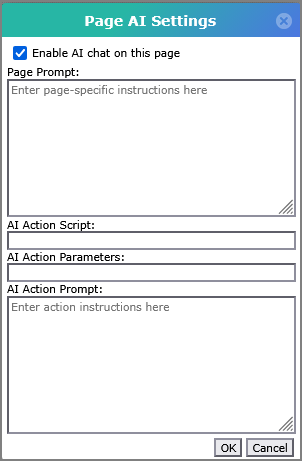
The
Page AI Settings dialog box opens. -
In the Page AI Settings, you can set the following fields:
-
Enable AI chat on this page—Select this box to enable the AI chat window on this page.
-
Page Prompt—Enter a prompt in this field to give the AI chat more context about what this page does. This is optional, but it helps the chatbot give better answers.
-
AI Action Script—Enter the file path for the script you want to invoke.
-
AI Action Parameters—Enter the names of the parameters in the AI action script as a comma-separated list. The AI fills these parameters with values as defined in the AI action prompt.
-
AI Action Prompt—Enter a prompt for the AI that describes what actions are available, what parameters can be filled, and how to parse the user's query.
-
-
Click OK when you are done with the settings.
-
Click Save in the DivePort toolbar to save your changes.