PDF Click Action Options
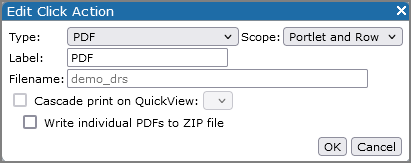
| Option | Description |
|---|---|
| Type | Specifies the click action type. |
| Scope | Specifies the click action scope. Options include Portlet, Row, Portlet and Row, and Link. Available options vary, depending on the type of portlet. |
| Label | Specifies the label that displays in the click action context menu. |
| Filename | Specifies a custom name for the click action export file. For information about the default file name, see About PDF Click Actions. |
| Add Parent Information | Available for |
| Cascade print on QuickView |
Applies to measures and marker portlets only. Generates a merged pdf file that contains a separate page for each value of the specified QuickView. TIP: This option is not intended for QuickViews that have a large number of values. Consider using DIAL to generate pdf files in those cases. |
| Write individual PDFs to ZIP file | Applies to measures and marker portlets with the Cascade print on QuickView option selected. Generates a zipfile that contains an individual pdf file for each value of the specified QuickView. |
See also: