About External Macros
External macros are defined outside the DivePort portal, and are stored in a text file called macros.txt, which is located in the DI\Solution\webdata\<diveport>\ directory. The macros.txt file must be tab-delimited with headers and the following two columns:
-
Macro Name
-
Definition
Typically, external macros change over time. For example dates for data.
Consider the following:
-
In DivePort, the macros.txt file is read-only.
-
DivePort reads the file for every session, regardless of modified time.
-
DivePort reloads the file when changes are made.
-
DivePort reloads the file when a user refreshes the page or logs out and back in.
-
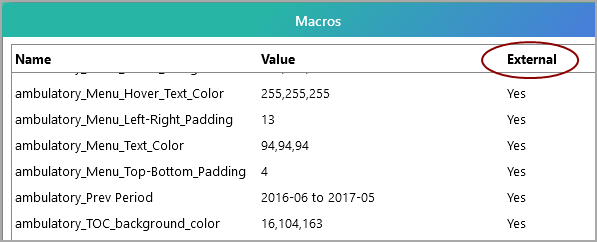
Macros defined in the macros.txt file are listed in the ADMIN > Macros dialog box and are labeled External.
-
-
Internal macros override those of the same name in the external macros.txt file. In the ADMIN > Macros dialog box, they are labeled Override, and leave the value from the external file useless.
-
Macro names cannot contain quotation marks, parentheses, or commas.
-
When used, macros expand recursively.
-
Information in the macros.txt file is potentially available to anyone who visits that DivePort portal, even if they have not logged in.