Accessing the DivePort Web API
Data in the DivePort Web API is accessible via two methods: Connecting through code, or logging into the API in a web browser.
NOTE: A user access token is required to access the Web API. For more information, see Workbench Help
 Accessing the Web API in Code
You can access the DivePort Web API with any code process that supports web APIs. To use the API you must authenticate with an access token (password authentication is not supported). There are two ways to authenticate with the API:
-
Passing the access token in the URL query (token=...).
-
Through the HTTP header (Authorization: Bearer ...).
For single synchronous requests, using an access token with these authentication methods are convenient because the client does not need to keep track of any session state. However it is slower for multiple requests, and you cannot run asynchronous requests using these methods.
The alternative method to authenticate is to start a session by logging in using the /api/login URL ending. That request returns a session token, which can be used instead of your access token for future requests. This is much faster for subsequent requests, and it allows the use of asynchronous requests.
The session will time out if it is idle for 2 minutes. To keep the session active, such as in situations where user input is required, you can periodically send a simple request such as /api/info to keep the session active.
Examples
Python - Synchronous Request
This example returns summary data from a cBase as plain text, using a single synchronous request.
from urllib.parse import quote
from urllib.request import urlopen

access_token = "ditok-AAAAAAAAAAAAAAAAAAAA"

response = urlopen("https://my-site.example.com/diveport/api/query"
    + "/" + quote("My Project") + quote("/cbases/My Data.cbase")
    + "?token=" + access_token
    + "&dimension=" + quote("Customer")
    + "&column=" + quote("Units")
    + "&format=tsv")
print(response.read())This example uses asynchronous requests to get the first 100 results of a query
from urllib.parse import quote
from urllib.request import urlopen
import json
from time import sleep

access_token = "ditok-AAAAAAAAAAAAAAAAAAAA"

# Log in to create a session and get the session token
response = urlopen("https://my-site.example.com/diveport/api/login"
    + "?token=" + access_token)
response_json = json.loads(response.read())
session_token = response_json["sessionToken"]

# Start an asynchronous query and get the job ID
response = urlopen("https://my-site.example.com/diveport/api/async/query"
    + "/" + quote("My Project") + quote("/cbases/My Data.cbase")
    + "?token=" + session_token
    + "&dimension=" + quote("Customer")
    + "&column=" + quote("Units")
    + "&format=tsv")
response_json = json.loads(response.read())
job_id = response_json["jobId"]

# Wait for the job to finish
while True:
    response = urlopen("https://my-site.example.com/diveport/api/async/job"
        + "/" + job_id)
    response_json = json.loads(response.read())
    if response_json["status"] == "complete":
        break
    sleep(1)

# Get the first 100 rows as JSON
response = urlopen("https://my-site.example.com/diveport/api/async/job"
    + "/" + job_id + "/data"
    + "?limit=100")
response_json = json.loads(response.read())
print(json.dumps(response_json["rows"]))This example returns summary data from a cBase as plain text, using a single synchronous request.
curl -s "https://my-site.example.com/diveport/api/query/My%20Project/cbases/My%20Data.cbase?token=ditok-AAAAAAAAAAAAAAAAAAAA&dimension=Customer&column=Units&format=tsv"You can access some aspects of the DivePort Web API in a browser, where certain actions are accessible to anyone with a valid user access token. To access the DivePort Web API in a browser:
-
Open a web browser.
-
Type your DivePort web address in the URL bar. Add /api/ to the end of your DivePort web address. For example, www.mywebsite.com/diveport/api/.
-
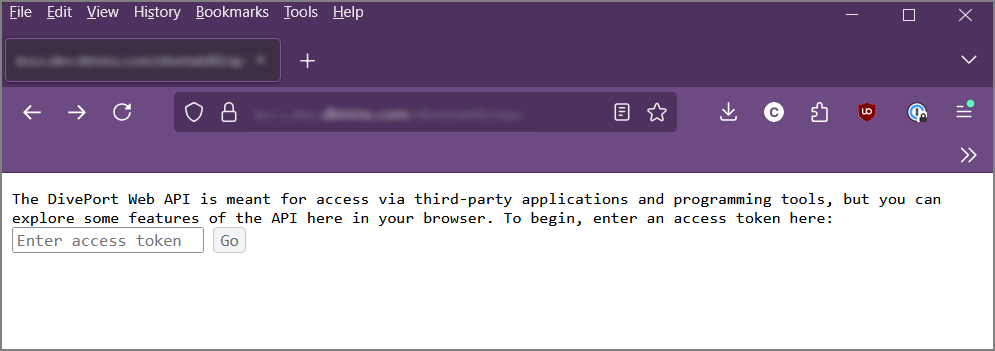
Navigate to that web address. The Web API welcome screen opens.
-
Enter your user access token, including "ditok".
-
Click Go. The Web API project navigator opens.
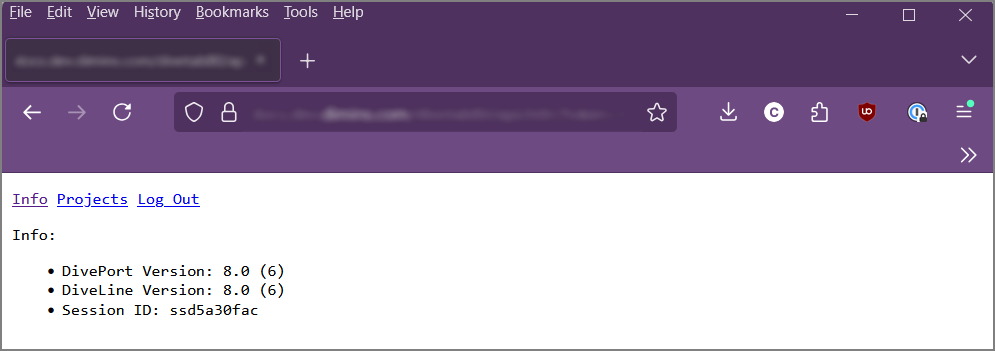
From the project navigator you can view info on projects and files within projects, and run basic dives on cBases, cPlans, and Measure Factory output.