
| Option |
Description |
|---|---|
| Type | Specifies the type of click action. |
| Scope | Specifies the click action scope. Options include Portlet, Row, Portlet and Row, and Link. Available options depend on the type of portlet. |
| Label | Specifies the label that appears in the click action context menu. The default is View Document. |
| Library | Specifies the document library that holds the document that you want to view. Select a library from the list of all document libraries associated with your portal. |
| File path | Specifies the path to the file that you want to view. This is the row of the document library that lists the file that you want to view. |
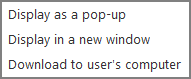
| Document delivery |
Select the manner in which you want users to view the document:
|
| Conditional |
Specifies that the click action is available only if the value in the column specified in the adjoining box is a non-zero number or non-empty string. For example, if the option is set as follows:
This option is cleared by default. For more information, see About Conditionalized Click Actions. |

See also: