If you are a DiveLine administrator, you can use the DivePort proxy logon feature to simulate logging on as another user.
To log on as a proxy:
- On the title bar, select ADMIN > Proxy Logon.
-
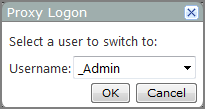
The Proxy Logon
 dialog box opens.
 -
Select a user from the Username list, and then click OK.
The
current page reloads, showing you what the selected user sees. The END PROXY (<username>) option appears in the title bar, where <username> is the user you switched to.

To log off from the proxy account, on the title bar click END PROXY or LOG OFF.
- END PROXY returns you to the current page, logged on to your own account.
-