Prerequisite
The document manager portlet uses a structured repository of documents located on the web server. For information about creating a repository, see Creating a Document Repository.
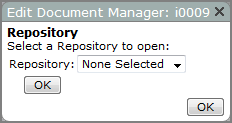
| Option | Description |
|---|---|
| Repository | Identifies the document repository that you want to access. |
| OK (left side) | Saves the Repository setting and opens the next Edit Document Manager dialog box. |
| OK (right side) | Closes the Edit Document Manager dialog box. |

| Option | Description |
|---|---|
| Select a Different Repository | Returns to the first Edit Document Manager dialog box, which you can use to choose a different repository. |
| Edit the Presentation Settings |
Opens the Edit Documentation Manager, Presentation Settings
|
| Edit the Filter Settings |
Opens the Edit Documentation Manager, Filter Settings Available attributes appear as check box options.
|
 dialog box

See also Adding a Documentation Manager Portlet.